Introduction
You have built your product, set up your Shopify store, and started your first ad campaigns. Orders begin coming in. Day 3 you have 20 orders. Day 10 you have 80. By week 4 you are processing 150 orders a day and suddenly realise your logistics is not ready for any of it.
Most D2C founders discover their shipping gaps at the worst possible time - when orders are live and customers are waiting. The 30 minutes spent configuring shipping properly before you launch saves weeks of damage control after.
India's D2C market is one of the world's fastest-growing. Getting logistics right from the first 500 orders sets the operational foundation that either scales with you or breaks under volume. This checklist tells you exactly what to configure before you ship your first batch.
Phase 1: Platform and Account Setup
1. Register on a Courier Aggregator - Not Direct
Booking directly with individual couriers at low volume gives you rack rates. A courier aggregator gives you pre-negotiated bulk rates across multiple courier partners from day one. iCarry®'s free Bronze plan - no monthly fee, no minimum - is the right starting point for every D2C brand before the first order ships.
Watch How to Sign Up and Activate Your iCarry® Account and get your account live in under 5 minutes.
2. Complete KYC and Wallet Top-Up
KYC approval is required before your first booking. Have your business PAN, GST registration, and bank account details ready. Top up your wallet with enough balance for your first expected week of shipments - a depleted wallet stops bookings mid-dispatch.
3. Connect Your Store
Connect your Shopify store (or WooCommerce, WIX, Flipkart, or other platform) via the Api connector in Main Menu > Integrations. Orders sync automatically within 15 minutes. This eliminates manual address entry - the leading source of dispatch errors at early scale.
4. Set Up COD Remittance Destination Account
Decide how COD collections are remitted: bank only, auto-split between bank and wallet, or wallet-only, and configure this before your first COD order ships. COD remittance is typically processed automatically every business day on a T+7 cycle at no additional cost, ensuring steady and predictable cash flow as order volume grows. For businesses that require faster access to funds, early COD remittance options from T+0 to T+4 are also available at a nominal cost, allowing greater flexibility in managing working capital without disrupting operations.
Phase 2: Courier and Rate Configuration
5. Compare Rates for Your Top 5 Delivery Pincodes
Before going live, check what it actually costs to deliver to your top customer locations. Zone D orders to North India cost significantly more than Zone A metro orders. Price your shipping rates or free shipping thresholds based on real zone data - not assumptions. Use iCarry®'s rate calculator to compare rates across multiple couriers for your exact pincodes.
6. Configure Routing Rules by Order Type
Set default courier rules before orders start flowing:
- COD orders to Tier 2 cities - route to best RTO performer (typically Xpressbees or Delhivery)
- High-value prepaid orders - route to Blue Dart for reliability
- Lightweight metro orders - route to Amazon Shipping for competitive rates
- Same-day city orders - configure Borzo via iCarry®
7. Enable Delivery Boost for COD Orders
Before your first COD order ships, decide whether to enable Delivery Boost. For fashion, lifestyle, and other COD-heavy categories, enabling it early helps prevent failed delivery patterns from becoming common in your shipping data. When a shipment is marked as undelivered, such as "customer not available" or "address issue," trained agents step in to verify the situation, contact the customer, and coordinate reattempts. Multiple follow-ups are made to ensure the delivery is completed wherever possible, reducing unnecessary returns. Delivery Boost is available at a nominal cost per shipment.
8. Activate WhatsApp Engagement
Configure WhatsApp Engagement before your first shipment. Customers receive out-for-delivery alerts from iCarry®'s official number (+91-63621-82961). This is a two-way communication channel, allowing customers to reply directly to confirm availability, reschedule deliveries, or update address details without needing a support call. All conversations between the iCarry® team and the customer are recorded and visible to the seller within the iCarry® panel, providing full visibility and helping reduce missed deliveries and support queries from the start.
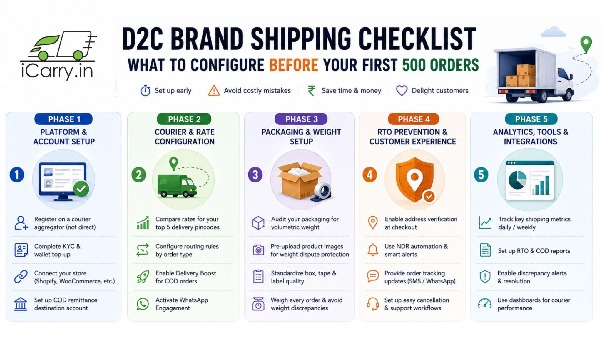
Phase 3: Packaging and Weight Setup
9. Audit Your Packaging for Volumetric Weight
Before shipping order one, calculate the volumetric weight of your standard parcel: L x B x H (in cm) / 5,000. If it is higher than actual product weight, right-size your box. This is a one-time fix that reduces per-shipment cost permanently.
10. Pre-Upload Product Images for Weight Dispute Protection
Upload photos of your standard sealed parcels (with weight scale visible) in the Products section of iCarry®. This enables automatic weight discrepancy dispute triggering. How to dispute weight discrepancy charges covers exactly why this matters - disputes must be filed within 5 days.
11. Standardise Your Dispatch Station
Set up a packing station before volume picks up - tape dispenser, correct box sizes per SKU, label printer, poly mailers, and bubble wrap within arm's reach. A packer who leaves the station for supplies adds 30 to 60 seconds per order. At 200 orders per day, that is 100 minutes of wasted time daily.
Phase 4: RTO and NDR Configuration
12. Enable Address Quality Scoring
Address Quality Scoring is enabled by default in iCarry® and does not require any manual setup. As soon as an order is booked, each address is automatically scored for delivery risk. Addresses flagged as Poor or Very Poor can be reviewed and corrected before the shipment is picked up, helping prevent failed delivery attempts before they occur.
13. Set a Daily NDR Review Routine
Before you have any NDRs, define the routine for when you do: check My Shipments > NDR section every morning, update instructions on every failed attempt within 24 hours, request reattempt immediately. Systematic RTO reduction only works if NDR follow-up is a daily habit from order one.
Watch Overview of My Account > My Shipments to see how NDR, weight discrepancy, and tracking all appear in one dashboard view.
14. Configure COD Order Confirmation
Set up a WhatsApp message that goes out within 30 minutes of every COD order placement asking the customer to confirm. This eliminates impulse COD orders that generate doorstep refusals. The WhatsApp Engagement feature handles this automatically.
Phase 5: Financial and Compliance Setup
15. Model Your True Cost Per Delivered Order
Before setting product prices, calculate: base freight + fuel surcharge + COD fee (if applicable) + expected RTO percentage cost. Your shipping charge to the customer or free shipping threshold must cover this full number - not just the base rate. At ₹80 headline freight with 20% RTO on COD orders, your effective per-delivered-order cost is closer to ₹116.
16. Set Up GST-Compliant Shipping Invoicing
Ensure your store generates GST-compliant invoices with correct HSN codes for your products and correct GST treatment for shipping charges. Hidden shipping charges in India covers how billing works across courier partners and what to watch for on your monthly invoice reconciliation.
17. Define Your Return and Exchange Policy
Write your return policy before the first order ships. Define: return window (7 to 15 days), product condition required, who pays return shipping, refund timeline, and exchange process. Publish it at checkout, in order confirmation emails, and in the parcel as an insert card.
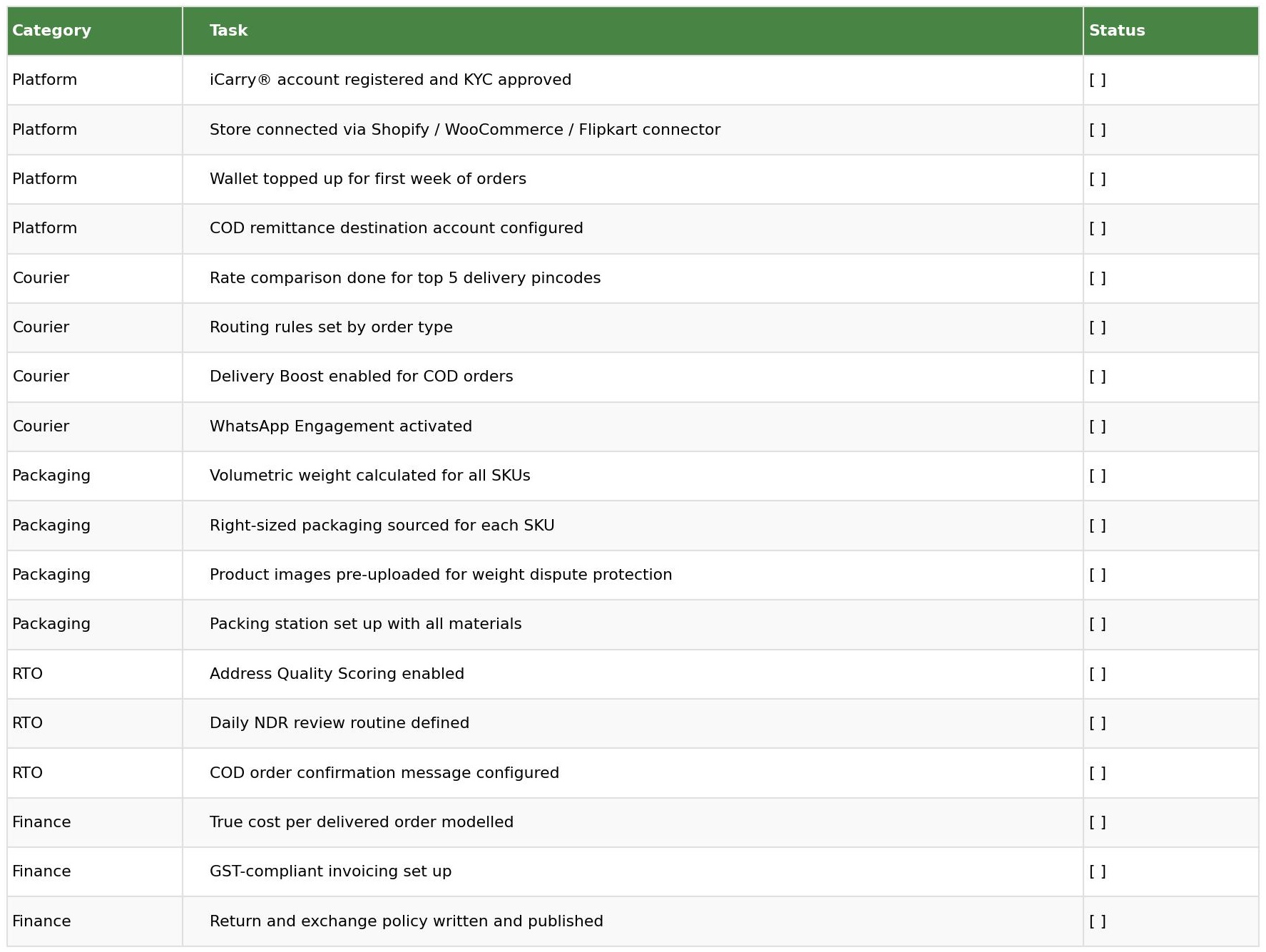
Pre-Launch Shipping Configuration Checklist
Final Thoughts
Every item on this checklist takes under 30 minutes to configure. Together they represent the difference between a logistics operation that scales cleanly through your first 500 orders and one that generates customer complaints, margin losses, and constant operational issues from week two.
Configure all 17 items before your first dispatch. Then ship confidently.
iCarry® supports businesses of all sizes, from startups to high-volume operations, with a unified logistics platform that includes a free Bronze plan with no minimum volume, along with Delivery Boost, WhatsApp Engagement, Address Quality Scoring, and daily COD remittance. Start free at iCarry.in.
Frequently Asked Questions (FAQs)
What should a D2C brand set up before shipping first orders?
Register on a courier aggregator (iCarry® free plan), connect your store, configure COD remittance, right-size packaging, enable Delivery Boost and WhatsApp Engagement, pre-upload product images for weight dispute protection, and define your return policy.
Why use a courier aggregator instead of booking directly?
Courier aggregators give you pre-negotiated bulk rates, multiple courier partner access, and unified tracking from day one - without the volume minimums required for direct courier contracts. iCarry®'s free Bronze plan has no monthly fee and no minimum shipments.
How do I calculate the right shipping charge to show customers?
Calculate your full per-order cost: base freight + fuel surcharge + COD fee (if applicable) + expected RTO percentage cost. Your customer-facing shipping rate or free shipping threshold must cover this full number - not just the base courier rate.
What is Delivery Boost and why should D2C brands enable it from the start?
Delivery Boost deploys trained agents from iCarry®, who call customers before delivery and audit fake NDRs. Enabling it from order one prevents fake non-delivery habits from building in your order data - much easier than correcting a high RTO rate after 3 months of shipping.
How many couriers do I need for my first 500 orders?
Access multiple courier partners from the start - not to use all of them simultaneously, but to have the routing flexibility to send different order types to the right courier. Route COD Tier 2 orders differently from high-value metro prepaid orders. iCarry® gives you this flexibility from one account.
Every item on this checklist takes under 30 minutes to configure. Together they represent the difference between a logistics operation that scales cleanly through your first 500 orders and one that generates customer complaints, margin losses, and constant operational issues from week two.