
A handicrafts manufacturer in Jaipur receives an inquiry from a buyer in London. They have beautiful products, a strong price, and a buyer ready to place a first order. Then the buyer asks for the IEC number for the commercial invoice. The manufacturer does not have one. The order is delayed by three weeks while the IEC is obtained.
An IEC takes 2 to 3 working days to register online. The three-week delay was not procedural - it was the result of not knowing the process in advance.
Every Indian business that imports or exports commercially needs an IEC (Import Export Code). Issued by DGFT (Directorate General of Foreign Trade), the IEC is the foundational registration for international trade - without it, no shipping bill can be filed, no bank can process export remittances, and no commercial import can clear customs. It is sometimes called the 'passport for international trade.'
This guide walks through the complete IEC registration process on the DGFT portal - every document required, every field to fill, and every step from application to issuance.
What Is an IEC (Import Export Code)?
An IEC (Import Export Code) is a 10-digit registration number issued by DGFT that every business needs before it can legally import or export commercially from India. Without it, no shipping bill can be filed, no bank can process an export remittance, and no commercial import can clear customs. It is a one-time registration with lifetime validity, though it must be confirmed annually on the DGFT portal to stay active.
How to Check What You Need Before Starting Your IEC Application
- PAN card of the applicant (individual, firm, or company)
- Aadhaar card of the applicant (for proprietorships) or authorised signatory
- Active bank account in the name of the business with bank certificate or cancelled cheque
- Business address proof (electricity bill, rent agreement, or property tax receipt)
- GST registration certificate (if GST registered)
- Digital Signature Certificate (DSC) - Class 2 or 3 (optional for basic IEC but required for some DGFT transactions post-issuance)
- Mobile number and email address linked to the PAN for OTP verification
Who Needs an IEC?
Any person, firm, company, LLP, trust, or HUF engaged in commercial import or export from India. The key word is commercial - personal imports and exports (gifts, personal purchases) below specified thresholds do not require an IEC. Every commercial transaction does require an IEC.
One IEC per PAN: A business entity can hold only one IEC. If you have multiple businesses under different PANs, each PAN can have its own IEC. You cannot hold two IECs under the same PAN.
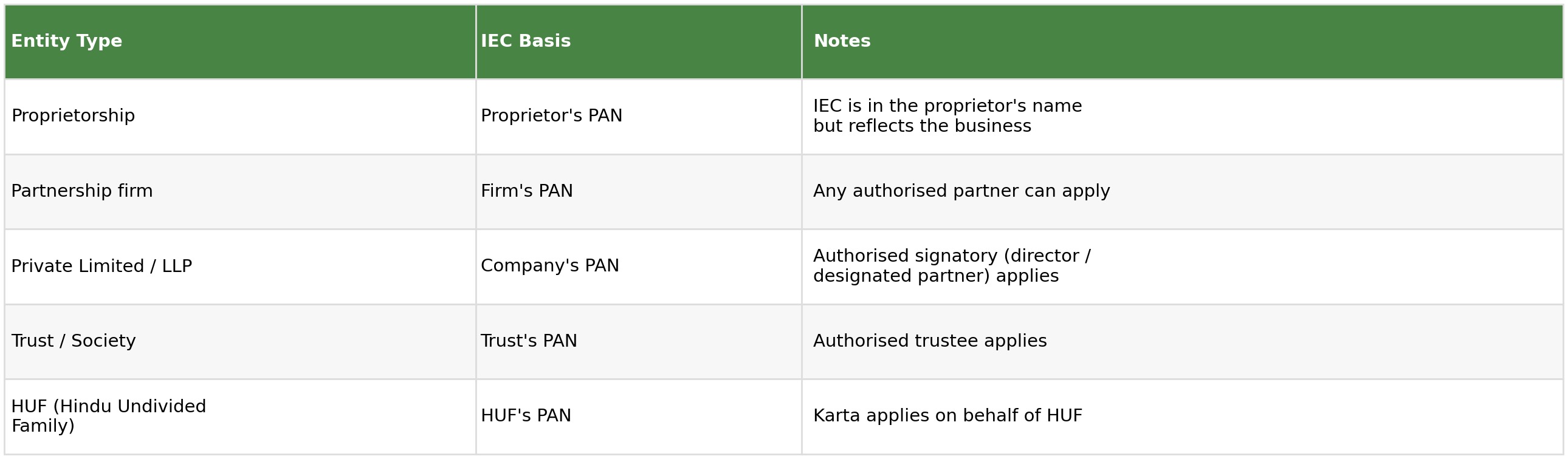
Step-by-Step IEC Registration Process on the DGFT Portal
Step 1: Register on the DGFT Portal
- Go to: dgft.gov.in
- Click 'Login' on the top right. Select 'Register' if you do not already have a DGFT account
- Choose registration type: 'IEC Holder' for a new IEC application
- Enter your mobile number and email address. Both must be active - OTPs will be sent to both
- Verify via OTP. Set a strong password. Your DGFT login is created
Step 2: Link Your PAN
- After login, go to 'Services' > 'IEC Profile Management' > 'Apply for IEC'
- Enter your PAN number. The system will auto-record your name as per Income Tax records
- Verify the PAN details are correct - the name on the IEC will match the PAN holder's name exactly as it appears in Income Tax records
- If the PAN name has spelling errors or differs from your business name, get the PAN corrected first before proceeding
Step 3: Fill Business Details
- Business name: For proprietorships, this is typically the trade name or 'proprietor name T/A trade name'. For companies and LLPs, the registered company name
- Nature of concern: Select from Proprietorship, Partnership, Private Limited, LLP, Public Limited, Trust, HUF, Government, etc.
- Business address: Enter the address where the business is registered. This must match the address proof document you upload. For exporters, this is typically the manufacturing or warehouse address
- Date of establishment: Date the business was incorporated or started
- Contact details: Business phone, email, and mobile. These will be used for all DGFT communications
Step 4: Add Bank Account Details
- Click 'Add Bank Account'
- Enter bank name, branch name, IFSC code, and account number
- Upload the bank document: cancelled cheque (showing account number, IFSC, and account holder name) OR a bank certificate on bank letterhead confirming the account details
- The bank account must be in the name of the IEC applicant - a personal account for a company IEC will be rejected
- Multiple bank accounts can be added. All export remittances linked to this IEC must be received into one of the registered accounts
Step 5: Upload Required Documents
All documents must be uploaded as clear, colour scans in PDF or JPEG format:
- PAN card copy: Clear scan of the PAN card. Both sides if the PAN has details on reverse
- Address proof: One of: electricity bill (not more than 2 months old), telephone bill, bank statement with address, rent agreement, or property tax receipt. The address must match the business address entered in Step 3
- Bank document: Cancelled cheque or bank certificate as described in Step 4
- Aadhaar (for proprietorships): Aadhaar of the proprietor for identity verification. For companies, the director's Aadhaar linked to the DIN (Director Identification Number)
- Photograph of applicant: Recent passport-size photograph of the authorised signatory
- GST certificate: Upload if GST registered. Not mandatory but strengthens the application
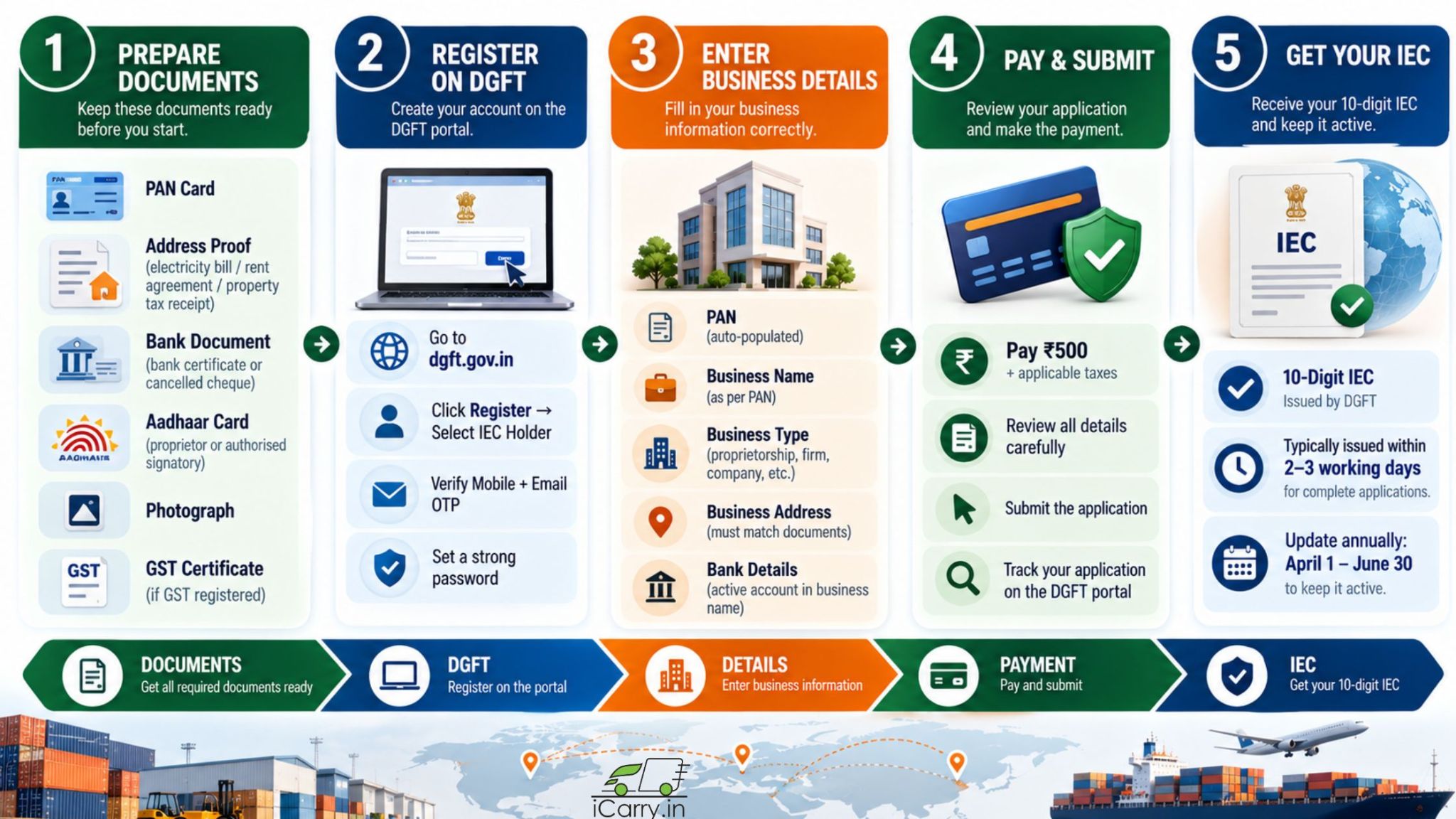
Step 6: Pay the Registration Fee
- Current IEC registration fee: ₹500 + applicable taxes
- Payment is made online via net banking, credit card, debit card, or UPI on the DGFT portal
- Payment is non-refundable. Ensure all details are correct before proceeding to payment
- After payment, a payment receipt is generated. Save this receipt
Step 7: Submit and Track the Application
- Review all details one final time before submission
- Submit the application. An application reference number is generated
- Track the application status under 'Services' > 'IEC Profile Management' > 'Track IEC Application'
- If additional documents or clarification are requested by the DGFT officer, respond within the specified timeframe
- IEC is typically issued within 2 to 3 working days for complete applications. Applications with discrepancies or missing documents take longer
Step 8: Download Your IEC Certificate
- When approved, the IEC certificate is available for download under 'IEC Profile Management'
- Download and save the IEC certificate in PDF format
- Your IEC number is a 10-digit number - this is your permanent import export code
- Print and store a physical copy. Share the IEC number (not the full certificate) with buyers and freight forwarders
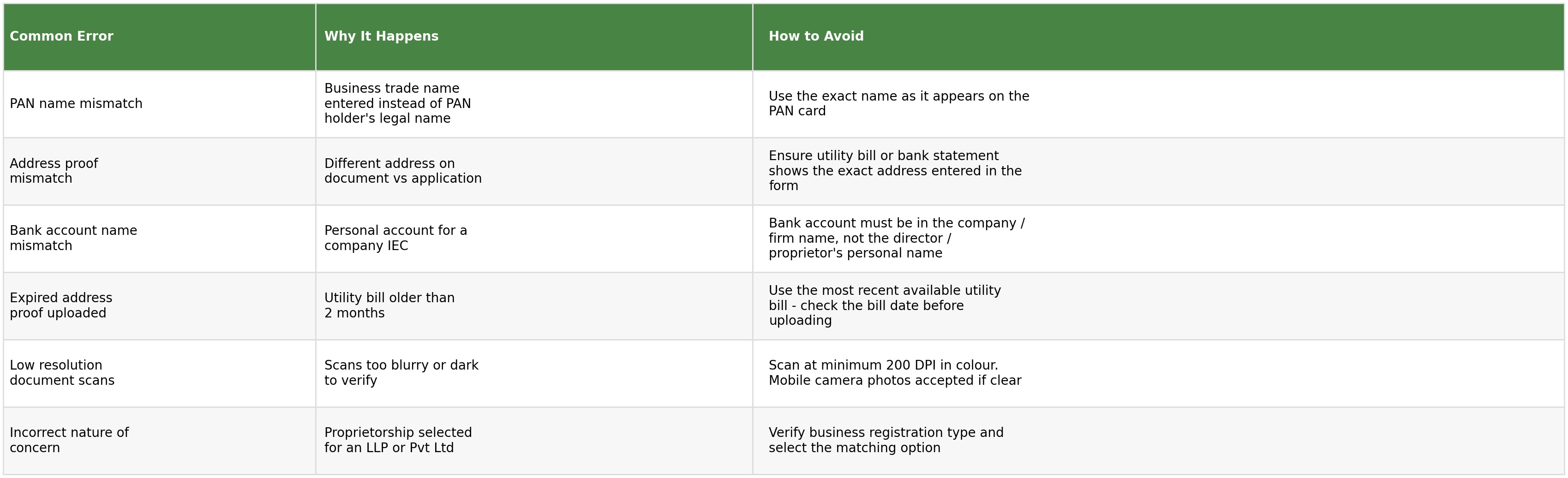
Common IEC Application Errors and How to Avoid Them
After Your IEC Is Issued - What to Do Next
Annual Update Requirement
Critical: The IEC must be updated annually on the DGFT portal between April 1 and June 30 each year. This is a confirmation that your details are current - even if there has been no change and no export activity. An IEC that is not updated in the April to June window becomes inactive. An inactive IEC blocks all exports until it is reactivated. Calendar this every year without exception.
Add IEC to All Export Documents
- Commercial invoices: IEC number in the seller's details section
- Shipping bill: your customs broker files this with your IEC
- Bank documents for export remittances: IEC linked to the account
- APEDA / FSSAI / other export promotion registrations: IEC is required for most export promotion scheme registrations
Register with Relevant Export Promotion Bodies
- APEDA RCMC: If you export scheduled agricultural and food products, register with APEDA using your IEC to obtain the RCMC (Registration-cum-Membership Certificate)
- FIEO: The Federation of Indian Export Organisations - membership provides export support services and certificates of origin
- Commodity-specific bodies: Spices Board (for spice exporters), Tea Board, Coffee Board, Gem and Jewellery Export Promotion Council, and others - based on your export category
How iCarry® Supports Indian Exporters
Once your IEC is in place, iCarry® provides the courier logistics for your export shipments - connecting you to FedEx and Aramex for international parcel-level exports: D2C orders, product samples, and small B2B consignments that do not require ocean freight.
- International courier access: FedEx and Aramex bookable from your iCarry® account after IEC registration. Compare rates by weight and destination before every booking
- Domestic courier for pre-export movement: Move goods from your manufacturing or warehouse location to freight forwarders and customs brokers using iCarry®'s domestic courier network
- Declared value coverage: Enable for export courier shipments to protect against loss or damage in transit to international buyers
- COD not applicable for exports: All international courier shipments via iCarry® are prepaid by the seller or the buyer based on agreed Incoterms
- Free Bronze plan, no minimum volume.
Final Thoughts
An IEC takes 2 to 3 working days to register, costs ₹500, and has lifetime validity. It is one of the simplest, fastest, and most impactful registrations an Indian business can obtain. Every day of delay in getting an IEC is a day of export opportunity lost.
The application process on the DGFT portal is fully online. Documents required are standard - PAN, address proof, bank details. The most common reason for delays is document discrepancies: names that do not match between PAN and address proof, bank accounts in wrong names, or utility bills that are too old.
Register before your first export inquiry - not after. And remember to update the IEC on the DGFT portal between April and June every year to keep it active.
Frequently Asked Questions (FAQs)
What is an IEC and who needs it?
IEC (Import Export Code) is a 10-digit registration number issued by DGFT (Directorate General of Foreign Trade) that is mandatory for all commercial import and export from India. Any person, firm, company, LLP, or trust engaged in commercial international trade needs an IEC. Without it, no shipping bill can be filed at Indian customs and no bank can process export remittances. Apply at dgft.gov.in.
How long does IEC registration take and what does it cost?
A complete IEC application with all required documents in order is typically approved within 2 to 3 working days on the DGFT portal. The registration fee is ₹500 plus applicable taxes, paid online at the time of application. The IEC has lifetime validity and does not need to be renewed - but it must be updated annually on the DGFT portal between April and June.
What documents are required for IEC registration?
PAN card, address proof (utility bill or bank statement not more than 2 months old), bank account document (cancelled cheque or bank certificate), Aadhaar of the proprietor or authorised signatory, and a passport-size photograph. GST certificate should be uploaded if GST is registered. All documents must match exactly - name on bank account must match the IEC applicant's name.
What happens if I do not update my IEC every year?
The IEC must be updated on the DGFT portal between April 1 and June 30 every year - even if no export activity occurred and no details have changed. An IEC not updated in this window becomes inactive. An inactive IEC blocks all export customs clearance until it is reactivated. Set a calendar reminder every year for April 1 to complete the annual IEC update.
Can a proprietor use their personal bank account for the IEC?
For a proprietorship IEC, a bank account in the proprietor's name that is used for business purposes is acceptable. For a company or LLP IEC, the bank account must be in the company or LLP's name - a personal account of a director is not acceptable. The account holder name on the bank document must match the IEC applicant's name exactly.
An IEC takes 2 to 3 working days to register, costs ₹500, and has lifetime validity - one of the simplest, fastest, and most impactful registrations an Indian business can obtain. Register before your first export inquiry, not after, and remember to update the IEC on the DGFT portal between April and June every year to keep it active.