
Why Show an Estimated Delivery Date
A customer deciding whether to buy has one question beyond price: when will it arrive? If the page does not answer, many customers leave, or buy and then message you on day two asking where the order is. A clear, honest delivery estimate does both jobs: it removes doubt before purchase and reduces anxiety after it. Under the Consumer Protection (E-Commerce) Rules, 2020, sellers must display delivery and shipment information, so a clear estimate also helps with compliance.
An estimated delivery date (EDD) is a promise, and a wrong promise is worse than no promise. Customers who are told 3 days and receive in 7 leave bad reviews, while customers told 5 to 8 days and receiving in 6 are happy. The goal is not the shortest date. It is a date you can actually keep.
What Is an Estimated Delivery Date?
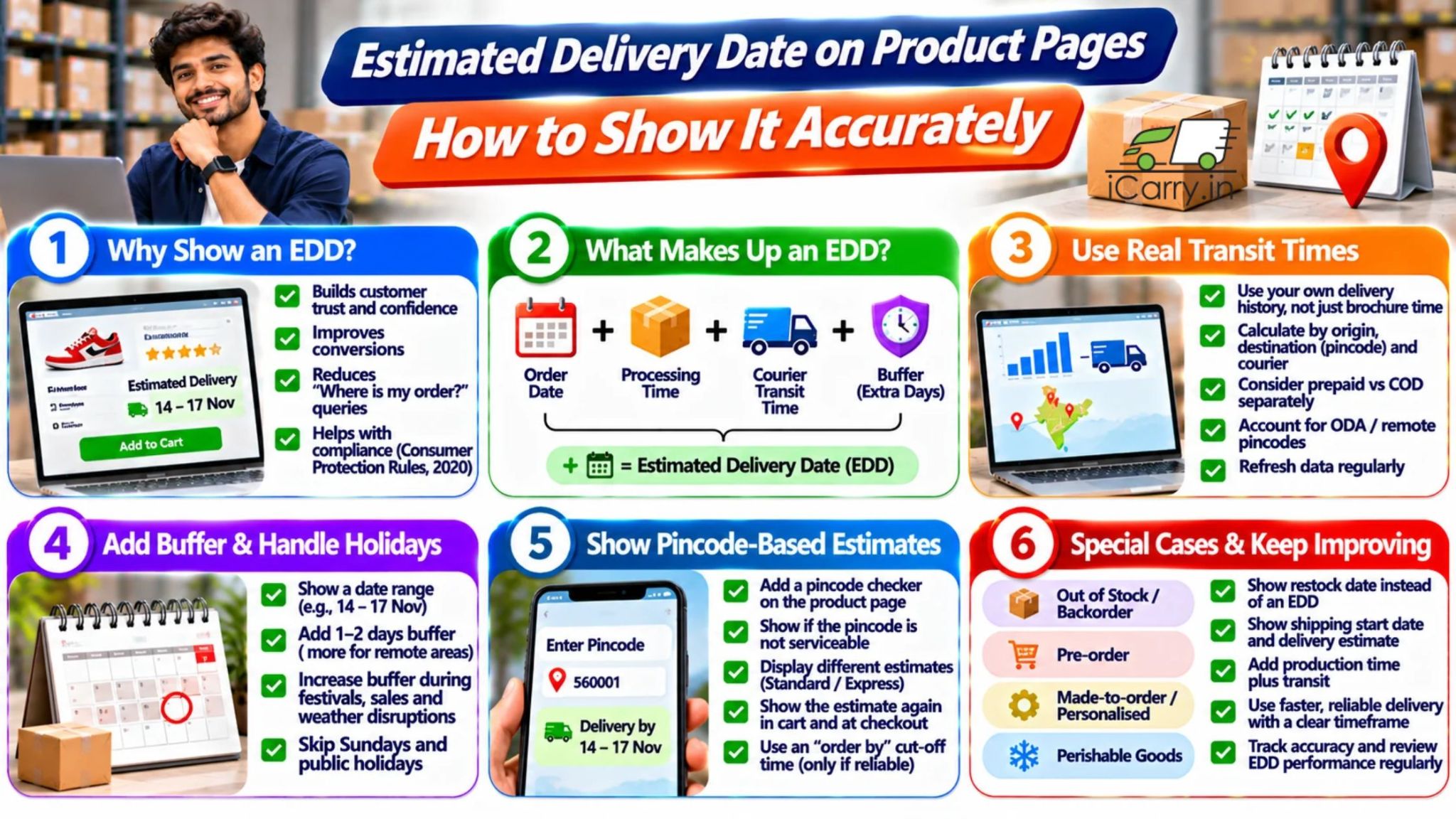
An estimated delivery date (EDD) is the date or date range you show a customer for when their order should arrive. It is built from the order date, processing time, courier transit time and a buffer, skipping non-working days. Showing it on the product page removes doubt before purchase.
What an EDD Is Made Of
EDD = Order date + processing time + courier transit time + buffer, adjusted for non-working days
- Order cut-off: Orders placed after your cut-off time count as the next working day
- Processing time: Time to confirm, pick, pack and hand over to the courier
- Courier transit time: Days in transit, based on origin, destination and the courier
- Buffer: Extra days for variation, peak periods and remote locations
- Non-working days: Pickups and deliveries do not run on every day. Sundays and public holidays need to be skipped
Step 1: Get Real Transit Times, Not Brochure Times
- Use your own delivery history, not only courier brochure numbers
- Calculate actual transit time by origin, destination zone or pincode, and courier
- Use the typical range, such as the middle 80 to 90 percent of deliveries, rather than the best case
- Separate prepaid and COD if their transit patterns differ
- Separate ODA and remote pincodes, which take longer
- Refresh the data regularly, because courier performance changes
Step 2: Set Processing Time Honestly
- State a cut-off time, such as orders before 2 PM dispatch the same day
- Use realistic processing time for your team, including packing and pickup timing
- Add time for COD confirmation if you confirm orders before dispatch
- For made-to-order or personalised products, add production time
- Do not assume same-day dispatch if your pickup is once a day at a fixed time
Step 3: Add a Buffer and Show a Range
- Show a date range, such as 'Delivery by 14 to 17 November', not a single day
- Add 1 to 2 days of buffer for normal conditions, and more for remote pincodes
- Increase buffers in peak periods such as festival season, sale events, monsoon and winter fog
- Make sure the range matches reality. If 20% of orders arrive after the later date, your buffer is too small
Step 4: Handle Non-Working Days
- Skip Sundays and public holidays in the processing and transit calculation
- Remember that many couriers run Monday to Saturday, with limited services on holidays
- Account for local holidays and regional festivals that affect destination cities
- Keep a holiday calendar in your system and update it each year
How to Make the Estimate Specific With a Pincode Check
- Add a pincode field on the product page and show the estimate for that destination
- Show a clear message if the pincode is not serviceable, rather than leaving the customer to find out at checkout
- Show different estimates for standard and express options, if you offer both
- Show the estimate again in the cart and at checkout, and make sure it is consistent
- Show the order-by time, such as 'Order within 3 hrs 20 mins for dispatch today', only if you can keep it
Special Cases
- Out of stock or backorder: Show a restock date, and do not show an EDD that ignores it
- Pre-orders: Show the shipping start date and the estimated delivery after it
- Made-to-order and personalised items: Show production time plus transit
- Perishable goods: Show only nearby zones and slot-based delivery
- Bulky or B2B orders: Show estimates that reflect freight transit and delivery appointments
- Occasion-based orders: For gifts, show an 'order by' date for each festival and zone
Measure Accuracy and Improve It
- On-time rate: The percentage of orders delivered within the promised date range
- Late deliveries by courier and zone: Find where your estimate is too optimistic
- WISMO queries: Count 'where is my order' contacts before and after introducing an EDD
- Review complaints: Check whether late-delivery reviews mention missed promises
- Adjust monthly: Update buffers and transit data using the latest results
Common Mistakes
- Showing courier best-case times as a promise
- Forgetting processing time or cut-off times
- Ignoring Sundays, holidays and peak seasons
- Showing one date for every pincode
- Showing an EDD on the product page that differs from the one at checkout
- Never checking whether the estimates were met
How iCarry® Helps You Build Accurate Estimates
iCarry® is a courier aggregator that gives you the shipping data and tools to base your estimates on facts.
- Shipment history: Export delivery data from My Shipments to calculate real transit times by zone and courier.
- Rate and serviceability checks: Check whether a destination pincode is serviceable and compare courier partners with the Domestic Shipping Rate Calculator before you commit to a promise.
- Multiple courier partners: Choose the courier that performs best on your main lanes, which can improve the accuracy of your estimates
- WhatsApp Engagement: Update customers proactively when a parcel is delayed, so the estimate and reality stay aligned
Not sure how to handle your shipping challenges? Contact iCarry® customer support for assistance with your shipping requirements and help resolving delivery-related issues.
Frequently Asked Questions (FAQs)
Should I show a date or a range for estimated delivery?
A range is safer. Courier transit varies, so a range such as 'Delivery by 14 to 17 November' sets honest expectations. Use a single date only if your on-time record supports it.
How do I calculate an estimated delivery date?
Add your order cut-off and processing time to the courier transit time for the destination, then add a buffer, skipping Sundays and public holidays. Use your own delivery history to set realistic transit times by zone and courier.
Does showing delivery dates increase sales?
It often helps because it removes uncertainty before purchase, and it reduces 'where is my order' queries after it. The benefit depends on the estimates being accurate, because missed promises damage trust and reviews.
How can I keep my estimates accurate in peak season?
Increase buffers for festivals, sales, monsoon and winter fog, restrict or flag remote pincodes, update transit data from recent deliveries, and track your on-time rate so you can adjust quickly.
Show a date range rather than a single day, built from the order cut-off, processing time, real courier transit time and a buffer, skipping Sundays and public holidays. Add a pincode check, keep the estimate consistent from the product page to checkout, and track your on-time rate to adjust every month.