What Is WooCommerce Shipping Integration?
WooCommerce shipping integration is the process of connecting your WooCommerce store to one or more courier services so that orders sync automatically, labels are generated in bulk, and tracking updates reach customers without manual data entry. For Indian sellers, it typically means connecting to a multi-courier shipping platform such as iCarry that allows sellers to compare rates and route orders based on destination, weight, and serviceability.
You built your WooCommerce store, set up your product catalog, and started getting orders. Then came the first 50 orders in a day. You opened the courier website, started entering addresses one by one, and realised immediately that this was not going to scale.
The right WooCommerce shipping integration connects your store directly to one or more courier services, pulls orders automatically, generates labels in bulk, syncs tracking back to the customer, and manages COD remittance - without any manual data entry. What a courier aggregator does and why it is the fastest path to multi-courier access for WooCommerce sellers is the foundation this guide builds on.
This guide covers everything an Indian WooCommerce seller needs to know - from choosing the right integration approach to step-by-step setup, troubleshooting, and how to get the most out of the connection once it is live.
Why WooCommerce Sellers in India Need a Shipping Integration
The Manual Booking Problem
At 10 orders per day, manually entering each customer's address into a courier portal is manageable - slow, but manageable. At 50 orders per day, it becomes a 2-hour daily task. At 200 orders per day, it requires a dedicated person doing nothing else.
Every manual entry is also a source of error. A wrong pincode, a transposed phone digit, a missed address line - each one either delays delivery or causes a failed attempt, generating an NDR and potentially an avoidable RTO. At scale, manual booking is not just inefficient - it is actively expensive.
What Integration Solves
A WooCommerce shipping integration eliminates the data entry step entirely. Orders flow from your store to the shipping platform automatically. You review, book, and print labels in bulk. Tracking numbers sync back to WooCommerce and to the customer without any manual copy-paste. Weight discrepancy disputes, COD management, and NDR follow-up all happen from one dashboard.
The result is fewer errors, faster dispatch, lower per-order processing cost, and the ability to scale order volume without proportionally scaling the operations team.
Integration Options for WooCommerce in India
Indian WooCommerce sellers have three main approaches to integrating courier services:
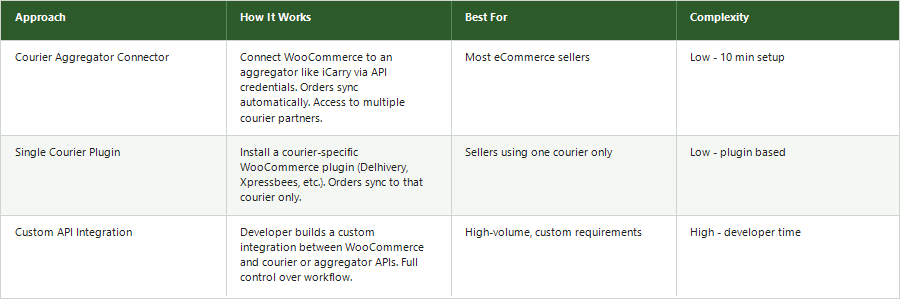
For most Indian WooCommerce sellers, the courier aggregator connector approach delivers the best balance of ease, flexibility, and feature access. It requires no plugin download, no developer, and gives access to multiple courier partners from day one. Infact, many sellers initially search for a WooCommerce shipping plugin in India, but a connector-based shipping integration can provide similar automation without managing multiple courier-specific plugins.
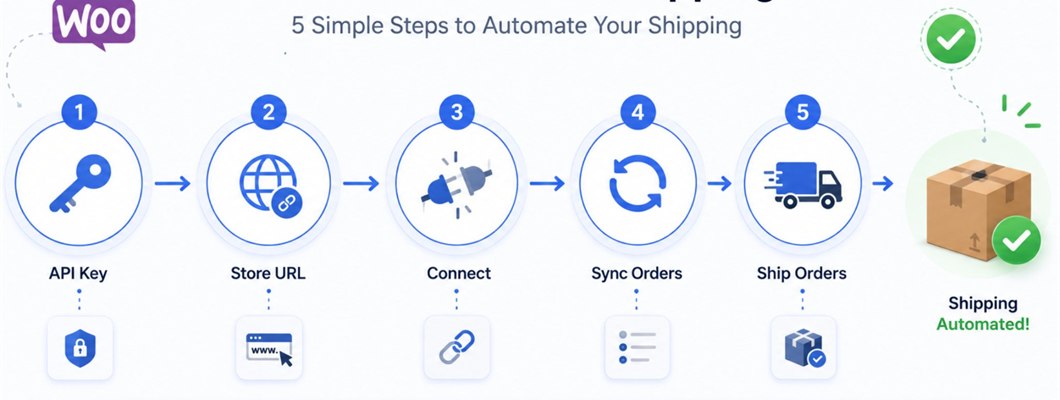
How to Connect WooCommerce to iCarry® - Step by Step
iCarry®'s WooCommerce integration is a no-code API connector. No plugin installation required. Setup takes under 10 minutes.
Step 1: Generate Your WooCommerce API Credentials
- Log in to your WordPress admin panel
- Go to WooCommerce > Settings > Advanced > REST API
- Click Add Key
- Enter icarry_private_connector in the Description field
- Set Permissions to Read/Write
- Click Generate API Key
- Copy the Consumer Key and Consumer Secret immediately - they are shown only once. If you miss them, you must delete the key and generate a new one.
Step 2: Find Your Store URL
Your Store URL is the domain portion of your WordPress site. If your admin is at https://yourstore.com/wp-admin, your Store URL is yourstore.com. Do not include https:// or trailing slashes or /wp-admin.
Step 3: Connect in iCarry®
- Log in to your iCarry® account
- Go to Main Menu > Integrations > WordPress API Settings
- Paste the Consumer Key into the Consumer Key field
- Paste the Consumer Secret into the Consumer Secret field
- Enter your Store URL - this is simply your website domain. If your admin URL is yourstore.com/wp-admin, your Store URL is yourstore.com. Do not include https://, /wp-admin, or any trailing slashes.
- Under Sync Order Statuses, define which WooCommerce order statuses you want to sync with iCarry®. Common selections are Processing, Pending, and On-Hold. Only orders in these statuses will appear in iCarry® for booking.
- Under Sync After Order ID, leave this blank if you are setting up the integration for the first time. iCarry® will automatically sync your recent orders. Only set this if you want to sync from a specific order number forward.
- Click Save
That's it. Your WordPress or WooCommerce store is now connected to iCarry.in. After setup, your orders will automatically sync to iCarry® within 15 minutes.
What Happens After the Integration is Live
Orders Appear Automatically
Every new WooCommerce order appears in iCarry®'s My Shipments under Unassigned within 15 minutes of placement. The customer's name, address, phone number, pincode, and order value all pull through from WooCommerce automatically.
Book Individually or in Bulk
For individual orders, click the Actions button on any order to review it, select a courier, and book. The shipping label is available immediately for printing.
To process multiple orders at once, select them using the checkboxes and click Bulk Book Shipment. iCarry® assigns the best available courier based on pincode serviceability and rate. All labels print in one action - no order-by-order processing required.
Tracking Syncs Back to WooCommerce
After booking, the tracking number and courier name sync back to the WooCommerce order automatically. Your customer receives their order status update through WooCommerce's standard notification flow - no manual tracking update required.
COD Orders Handled Automatically
WooCommerce COD orders are identified automatically from the payment method field. iCarry® books them as COD shipments with the courier. COD remittance runs automatically every business day (Monday to Saturday) on the T+7 cycle at zero cost for all plans including free.
Managing Shipping Rates on Your WooCommerce Store
One of the key decisions for WooCommerce sellers is how to display shipping rates to customers at checkout. You have three main options:
Free Shipping Above a Threshold
The most conversion-friendly option. Set a minimum order value (typically ₹499 to ₹999) above which shipping is free. Build the shipping cost into your product margin. Customers who see free shipping convert at higher rates and have lower cart abandonment.
Flat Rate Shipping
Charge a fixed shipping fee regardless of weight or destination. Simple for customers to understand. Works well when your products have consistent weight and your courier rates do not vary significantly by zone.
Live Rate Calculation
Display real-time courier rates at checkout based on the customer's pincode and order weight. Most accurate cost recovery but adds complexity to the checkout. Requires the WooCommerce shipping rate plugin to connect to courier APIs.
Whichever model you choose, the actual logistics cost per order must be factored into your pricing. Reducing shipping costs for your WooCommerce store covers how packaging, courier selection, and order volume interact to determine your real per-shipment cost.
COD Setup for WooCommerce Stores in India
COD remains the dominant payment method for Indian eCommerce outside metro cities. Setting it up correctly on WooCommerce and your shipping integration is essential for reaching the full Indian market.
Enabling COD in WooCommerce
Go to WooCommerce > Settings > Payments > Cash on Delivery > Enable. Configure which zones COD is available for. You can restrict COD by location, order minimum, or product category using WooCommerce's built-in rules or a shipping restrictions plugin.
COD Management Through iCarry®
When a WooCommerce order with COD payment method syncs to iCarry®, it is automatically identified and booked as a COD shipment. The courier collects payment at delivery. iCarry® consolidates all COD collections across your multiple courier partners and remits to your bank account automatically.
Destination account options for COD remittance:
- Bank only: Full COD amount goes to your bank. If wallet has a shortfall, remittance is held until resolved.
- Auto-split bank and wallet: iCarry® automatically splits remittance between your bank and wallet to clear any shortfall simultaneously. This is the recommended default.
- Wallet only: Full COD amount credited to your iCarry® wallet. Useful if you prefer to use COD collections to fund future shipments directly.
Reducing COD RTO on WooCommerce Orders
COD orders from WooCommerce stores tend to have higher RTO rates than marketplace orders, partly because the buyer has not been through the marketplace's buyer verification process. Reducing RTO systematically for WooCommerce COD specifically means address validation at checkout, WhatsApp confirmation after order placement, and active NDR follow-up within 24 hours of a failed delivery attempt.
iCarry®'s WhatsApp Engagement feature sends two-way delivery notifications from iCarry®'s official number (+91-63621-82961). For COD orders specifically, customers can also receive a WhatsApp confirmation message asking them to confirm intent before the order is dispatched - reducing doorstep refusals significantly.
Multiple Pickup Addresses for WooCommerce Sellers
WooCommerce sellers shipping from multiple locations - a warehouse, a retail store, and a home office for example - can configure multiple pickup addresses in iCarry®. When booking a shipment, select which pickup address applies to that order or batch.
iCarry® supports multiple pickup addresses through both the dashboard and the API. New pickup addresses can be added programmatically via the Add New Pickup Address API endpoint.
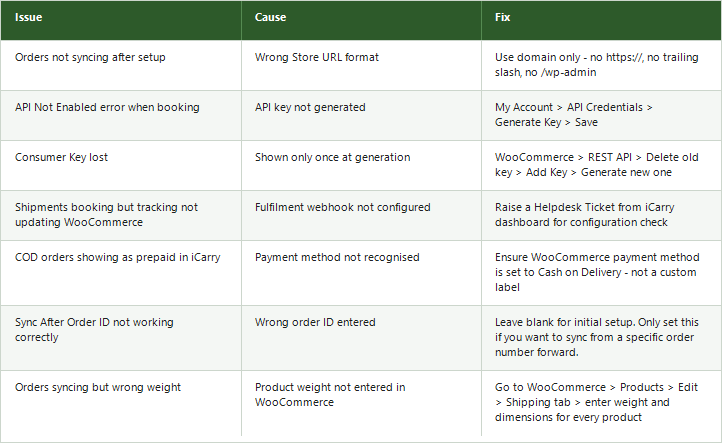
Troubleshooting Common WooCommerce Integration Issues
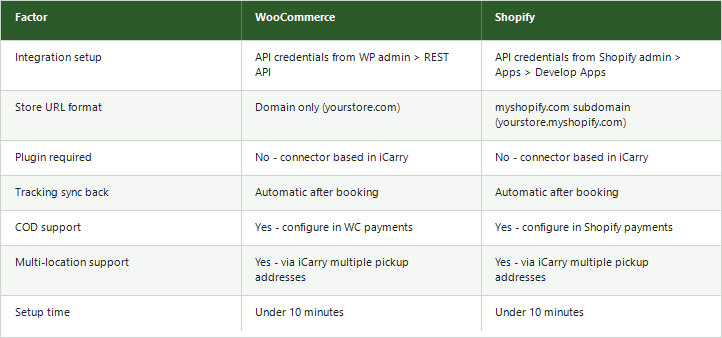
WooCommerce vs Shopify Shipping Integration - Key Differences
Monitoring Your WooCommerce Shipping Performance
Once the WooCommerce integration is live, the real work is using the data it generates to improve your operation. Key metrics to track weekly:
- Order processing time: How long from WooCommerce order to shipped status? Target under 24 hours.
- Fulfilment rate: What percentage of orders are dispatched on time? Stockouts and processing delays both show up here.
- First-attempt delivery success: What percentage of orders deliver on the first attempt? Below 80% indicates address quality or courier issues.
- RTO rate by courier and pincode: Which couriers are generating most returns? Which pincodes have structural delivery problems?
- Weight discrepancy rate: How often are couriers revising declared weight? High rates indicate packaging inconsistency or courier measurement issues.
The 7 logistics KPIs every eCommerce business should track covers the full monitoring framework with specific benchmarks for Indian WooCommerce stores.
iCarry® Features That WooCommerce Sellers Use Most
Bulk Booking
Select all pending WooCommerce orders and book in one action. iCarry® applies courier selection rules, generates labels for all orders, and updates fulfilment status back to WooCommerce simultaneously. For sellers processing 50 to 500 daily orders, this reduces the dispatch workflow from hours to minutes.
Delivery Boost
Trained agents call your WooCommerce customers on your behalf to confirm delivery, audit courier claims, and open tickets for fake NDRs. Particularly valuable for COD orders where buyer intent has not been pre-confirmed through payment.
WhatsApp Engagement
Two-way WhatsApp notifications from iCarry®'s official number keep your WooCommerce customers informed at every shipment milestone. Customers can reply directly to reschedule, update delivery address, or raise issues - reducing the volume of support queries your team has to handle manually.
Weight Discrepancy Management
Every weight discrepancy charge from courier partners appears in iCarry®'s dedicated section with old and new weights and charges side by side. Pre-upload product images for your standard WooCommerce SKUs to enable automatic dispute triggering - disputes are raised without any manual action when discrepancies arrive.
Final Thoughts
WooCommerce gives Indian sellers exceptional flexibility in how they build and manage their online store. The shipping integration setup - while requiring a few more manual steps than some hosted platforms - is straightforward once you understand the credential flow and takes under 10 minutes to complete.
The payoff is immediate. Orders sync automatically, labels print in bulk, tracking updates without manual effort, and COD remittance runs daily without any action required. As your WooCommerce order volume grows, the integration scales with it - the same setup that handles 50 orders a day handles 5,000 without any changes.
The next step after integration is using the performance data it surfaces to continuously improve - courier selection, RTO reduction, weight discrepancy disputes, and COD conversion all become data-driven decisions once you have a system that gives you visibility.
iCarry® integrates with WooCommerce in under 10 minutes, gives access to multiple courier partners, and includes free daily COD remittance on all plans from the free Bronze tier. Register free and connect your WooCommerce store today.
Frequently Asked Questions (FAQs)
How do I connect WooCommerce to a courier service in India?
The fastest method is through a courier aggregator like iCarry®. Go to WooCommerce > Settings > Advanced > REST API, generate an API key with Read/Write permissions, then go to iCarry® > Integrations > WordPress and paste the credentials with your Store URL. No plugin download required. Setup takes under 10 minutes.
Does iCarry® integrate directly with WooCommerce?
Yes. iCarry® has a no-code WooCommerce connector configured entirely from your iCarry® dashboard. Orders sync automatically within 15 minutes of placement and fulfilment status syncs back to WooCommerce after booking. No developer required.
What WooCommerce shipping plugins are available in India?
iCarry® provides a connector-based integration that does not require a plugin download. For sellers who prefer a plugin approach, several courier-specific WooCommerce plugins are available. However, connector-based integrations like iCarry® typically give access to multiple courier partners rather than just one.
How does COD work on WooCommerce with iCarry®?
Enable Cash on Delivery in WooCommerce payment settings. When COD orders sync to iCarry®, they are automatically identified and booked as COD shipments. iCarry® remits collected COD automatically every business day on the T+7 cycle at no cost. Early remittance from T+0 to T+4 is available at a nominal fee.
Why are my WooCommerce orders not syncing to iCarry®?
The most common cause is an incorrect Store URL format. Use your domain only - no https://, no trailing slash, no /wp-admin. Also verify your Consumer Key and Consumer Secret were copied correctly with no extra spaces. If the issue persists, open a Helpdesk Ticket from your iCarry® dashboard.
Can I use multiple couriers for my WooCommerce store through iCarry®?
Yes. iCarry® gives access to multiple courier partners from one platform. For each WooCommerce order, you can compare live rates across available couriers and select the best option for that specific pincode and weight - either manually per order or through bulk booking with automatic courier assignment.
How do I set up free shipping on my WooCommerce store?
Go to WooCommerce > Settings > Shipping > Add Shipping Zone > Add Shipping Method > Free Shipping. Set a minimum order amount above which free shipping applies. Build the logistics cost into your product pricing to ensure margin is maintained. Free shipping above a threshold typically increases average order value and conversion rate simultaneously.
What happens if my iCarry® wallet runs out during bulk booking?
Shipments will not book if wallet balance is insufficient. iCarry® sends email notifications when balance drops below a threshold. Top up your wallet through the Wallet section in your iCarry® dashboard before running any bulk booking session. Maintaining a minimum wallet balance covers unexpected weight discrepancy charges as well.
Do I need technical knowledge to connect WooCommerce to a courier service?
No. The iCarry® WooCommerce connector is configured entirely from your iCarry® dashboard - no plugin download, no code, and no developer required. You enter your WooCommerce store URL and an API key from your WooCommerce settings, and orders sync automatically from that point. Most sellers complete the setup in under 10 minutes on their first attempt.
WooCommerce shipping integration with iCarry® takes under 10 minutes to set up and immediately eliminates manual order entry, bulk-prints labels, syncs tracking back to your store, and runs COD remittance daily - all from one free account that scales from 50 orders a day to 5,000 without any changes.