The Real Cost of a Wrong Item
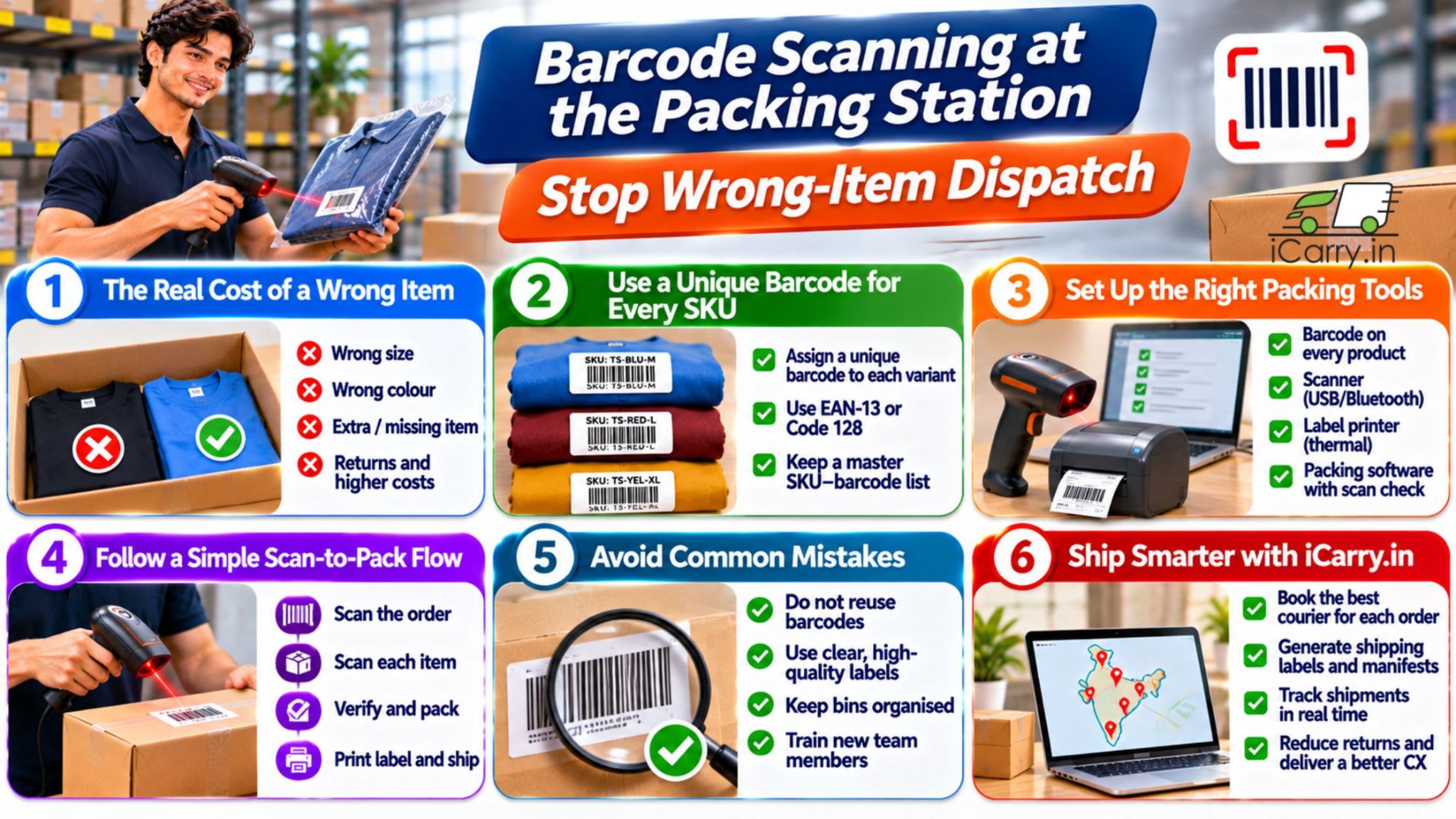
A customer orders a medium blue t-shirt and receives a large black one. The seller now pays for the forward freight, the reverse pickup, the replacement and the reship, and often loses the customer as well. The product was fine. The mistake happened at the packing table.
Wrong-item dispatch is one of the most avoidable causes of returns. As order volumes grow, manual checking by eye stops working. Similar-looking products, size and colour variants, and rushed sale days all raise the error rate. A barcode scan at the moment of packing turns a guess into a check.
What Is Barcode Scanning at the Packing Station?
Barcode scanning at the packing station is a check where the packer scans the order and then each item as it goes into the box. The system compares every scan with what the order should contain, so a wrong or missing item is caught before the parcel is sealed.
Why Wrong Items Get Packed
- Similar-looking SKUs: Products that differ only by size, colour, flavour or pack count
- Similar SKU codes: Codes like TS-BLU-M and TS-BLU-L are easy to misread
- Rushed packing: Sale days and peak hours put pressure on speed
- Poor shelf organisation: Mixed or unlabelled bins
- Manual pick lists: Handwritten or printed lists with no verification
- New team members: Fresh staff do not recognise every product yet
How Barcode Scanning Works at Packing
The principle is simple: the system knows what should be in the box, and the scan proves what actually went in.
- Step 1: The packer scans the order barcode, or the shipping label, to open the order
- Step 2: The system displays the items and quantities expected
- Step 3: The packer scans each item's barcode as it goes into the box
- Step 4: A correct scan turns green. A wrong scan alerts the packer immediately
- Step 5: When all items are scanned, the order is marked packed and the label is printed or confirmed
The packer cannot close the order until every item matches. That removes most wrong-item and missing-item errors at source.
What You Need to Set Up
1. A Barcode on Every SKU
- Assign a unique barcode to every variant, such as each size and colour. Do not use one barcode for a group of variants
- Use retail barcodes such as EAN-13 if the product has them, or generate your own SKU barcodes, such as Code 128
- Keep a master sheet linking each barcode to the SKU, product name and variant
- Never reuse a barcode for a different product
2. Print and Place Barcodes Correctly
- Print on a thermal label printer or good-quality sticker sheets so bars are sharp
- Stick the barcode on the product or its primary packaging, not only on an outer poly bag that may be swapped
- Place it in the same position on every unit, so scanning is quick
- Avoid curved or creased surfaces where scanners struggle
3. A Scanner
- USB scanner: Plug-and-play and reliable. Good for one fixed station
- Bluetooth or wireless scanner: Useful for larger packing areas and for picking
- Phone or camera scanning: Works at very low volume, but is slower and less reliable than a dedicated scanner
- 2D scanners: Needed if you use QR codes or small data matrix codes
4. Software to Check the Scans
- An order or warehouse management system with scan-to-pack verification is the best option
- A spreadsheet with scan-check formulas can work at low volume, as a stepping stone
- The software should record who packed which order and when, so errors can be traced
How to Run a Simple Scan-to-Pack Workflow
- Pick items to a tray, labelled with the order number
- At the packing station, scan the order barcode
- Scan each item as it is packed. Resolve any mismatch immediately
- Check quantity, size and colour on the screen before sealing
- Weigh the sealed parcel and record the weight
- Print the label, apply it and place the parcel in the dispatch area
- Scan the label at handover or batch the parcels for pickup
Print labels and manifests faster after packing. See the step-by-step iCarry® video tutorials.
Special Cases
- Kits and combos: Create a kit barcode, or require each component to be scanned
- Electronics and serial numbers: Scan serial numbers or IMEI numbers and store them against the order, which also helps with return disputes
- Food and expiry items: Scan batch and expiry data where your system supports it, and enforce first-expired-first-out
- Fashion variants: Size and colour need individual barcodes, because most mispacks happen here
Common Mistakes
- Duplicate barcodes: Two products with the same code defeat the system
- One barcode for all sizes: This removes the check on the variant
- Barcode only on the outer bag: A swapped product still scans correctly
- Poor print quality: Faded or smudged barcodes cause slow scans and workarounds
- Allowing manual override too easily: If packers can skip the scan, they will under pressure
- No error tracking: Without data, you cannot see which products or packers cause the most errors
Measure Your Error Rate
- Wrong-item rate: Wrong-item complaints divided by orders shipped, tracked monthly
- Error by SKU: Find the products that cause the most mistakes and fix their labelling or storage
- Error by packer and shift: Use it for training, not blame
- Cost per error: Add the freight, reverse pickup, replacement product and lost goodwill to see the true cost
- Before and after: Compare error rates before and after introducing scanning
Book return pickups when a wrong item slips through, with a free iCarry® account.
How iCarry® Helps Your Business
iCarry® is a courier aggregator that helps businesses manage shipping after orders have been picked, packed and verified. While barcode scanning and scan-to-pack verification happen in your own warehouse or order management system, iCarry® simplifies the shipping and delivery process.
- Multiple Courier Partners: Access multiple courier options from one account and compare available services before booking shipments.
- Bulk Booking and Label Printing: Upload and book multiple orders, then generate shipping labels and manifests to streamline dispatch.
- Pre-uploaded Product Images: Save standard SKU images to help support weight discrepancy disputes with relevant product and packaging evidence.
- Shipment Tracking: Track, filter and manage shipments from one dashboard after dispatch.
- Address Quality Scoring: Identify incomplete or potentially problematic addresses before dispatch to help reduce avoidable delivery issues.
- Delivery Boost: Get additional pre-delivery coordination to help reduce failed delivery attempts and improve delivery communication.
- Two-way WhatsApp Engagement: Let customers confirm availability, update address details or coordinate delivery, while keeping conversation history accessible.
- Reverse Shipment Booking: Arrange return pickups through iCarry® when a wrong item or another order issue requires a return.
By combining accurate scan-to-pack verification in your warehouse with iCarry® shipping and delivery tools, you can reduce avoidable dispatch errors, manage shipments more efficiently and improve the customer delivery experience.
Frequently Asked Questions (FAQs)
How does barcode scanning reduce wrong-item dispatch?
The system knows which items belong in the order, and each scan proves the right item went into the box. A wrong scan raises an alert, and the order cannot be closed until every item matches, which removes most wrong-item and missing-item errors.
Do I need a different barcode for each size and colour?
Yes. Each variant should have its own unique barcode, because most wrong-item errors in fashion and similar categories involve size and colour mix-ups. A shared barcode removes the check on the variant.
What equipment do I need to start scanning at the packing station?
A barcode on every SKU, a thermal label printer or good sticker sheets, a scanner such as a USB scanner, and software that checks the scanned items against the order. At very low volume, a spreadsheet and a phone scanner can work as a starting point.
Can I use a spreadsheet instead of a warehouse system?
At low volume, yes, as a starting point. A spreadsheet with scan-check formulas can flag mismatches, but it is slower and easier to bypass. As volume grows, an order or warehouse management system with scan-to-pack verification is more reliable.
Give every variant its own unique barcode, scan the order and then each item into the box, and block the order from closing until every scan matches. Then track errors by SKU and packer, and compare error rates before and after introducing scanning.