Frequently Asked Questions (FAQ's)
Find answers to the most common questions about shipping, APIs, and our platform.
iCarry.in does not require any minimum shipment volume. The rates shown on our homepage are automatically applied to your account. If your shipment volume increases, you may receive additional discounts and services, which are customized for each client.
No, GSTIN is not mandatory if your annual sales are under ₹40 lakhs, as per Government of India rules. You can create an account and start shipping without providing GSTIN. You will, however, need Proof of Identity (POI) and Proof of Address (POA) for KYC, typically PAN card and Aadhaar card. If additional KYC is required later, we will inform you via the phone number or email linked to your account.
Yes, we can pick up even a single shipment.
Yes, a minimum refundable deposit of ₹500 is required to start using our services. This amount stays in your iCarry wallet and is adjusted against shipping charges after delivery. Charges are deducted only after shipment is picked up and delivered. If a shipment is not picked or is canceled before pickup, there is no penalty and nothing is deducted. Your wallet balance is safe, does not expire, and is refundable if you decide to close your account, according to our T&C.
Wallet balances are refunded only when you close your account, following our T&C. Refunds are sent to the original payment method used for top-up. It may take 4–6 weeks for reconciliation of all shipments with couriers. An administrative closure fee of ₹100 (exclusive of GST) may apply in certain cases. Note that promotional credits cannot be refunded.
Booking a shipment is easy! Follow these steps:
1. Top up your account with the minimum balance as per your plan. This balance is like talk-time, has lifetime validity, and is fully refundable when you close your account. Shipment costs are deducted from this balance after delivery.
2. Book your shipment using CHOOSE COURIER and print the shipping label. It takes less than 2 minutes. If you don’t have a printer, you can save the label as a PDF and print later.
3. Prepare your box and stick the top part of the shipping label (with barcode) on it. The courier acknowledgment copy/manifest is the bottom (or right) portion separated by the dotted line. Ask the courier executive to put their name, mobile number, and signature on it. Keep the manifest for your records in case of disputes.
4. Hand over the box to the courier pickup executive when they arrive.
5. You can track your shipment anytime from My Shipments in your account.
▶ Watch Tutorial: Book Shipment – Select Courier, Print Label & Insurance
No need to call anyone. Once you book a shipment, a pickup request is automatically generated. The assigned pickup executive will call to confirm your shipment is ready.
Non-regular pickups are usually done within 1–2 business days. Shipments booked before 11 am are typically picked up the same day or by the next business day. Pickups happen from afternoon until around 8 pm.
If the pickup person cannot reach you, the pickup will be rescheduled for the next business day. If a pickup hasn’t happened after 2 business days, please open a Helpdesk Ticket to escalate.
You can generate the shipment label by clicking the Print button under the Actions column in My Account > My Shipments. The label will show your logo (if uploaded), courier name, barcode, and customer address.
For multiple shipments or advanced options (A4/A5, warehouse ID, manifest-only), select the checkboxes for the shipments and click Print Selected under Print Options above the shipment table.
Yes, printing is required because the barcode on the label is scanned during pickup and throughout the shipment journey to ensure proper tracking. Printers are inexpensive, and labels make your shipments look professional, enhancing your business image. We cannot provide printed labels via pickup executive.
▶ Watch Tutorial: Print Shipping Label – Single & Bulk Download
When booking a shipment, you can select COD as the shipment type instead of the default 'Prepaid' option. The declared shipment value will be the amount collected by the delivery executive at the time of delivery.
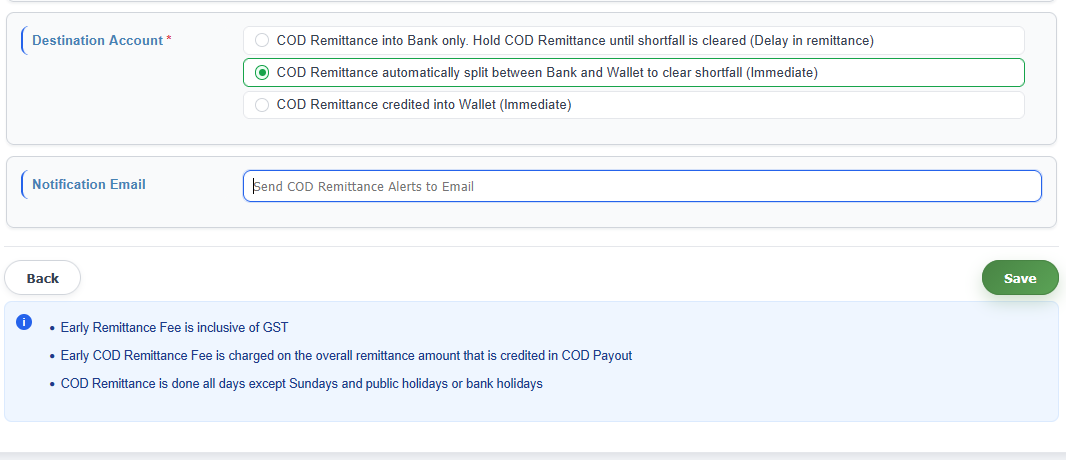
The money collected from your customer is credited either to your bank account or iCarry wallet, depending on your preference (default is bank account). To receive COD remittance in your bank account, please make sure your bank details are updated in Account Profile.
COD remittance is processed daily, except on Sundays and public holidays. The remittance includes all delivered COD shipments and is accompanied by a report. You can view the details in COD Remittance Report under My Account > My COD Remittances.
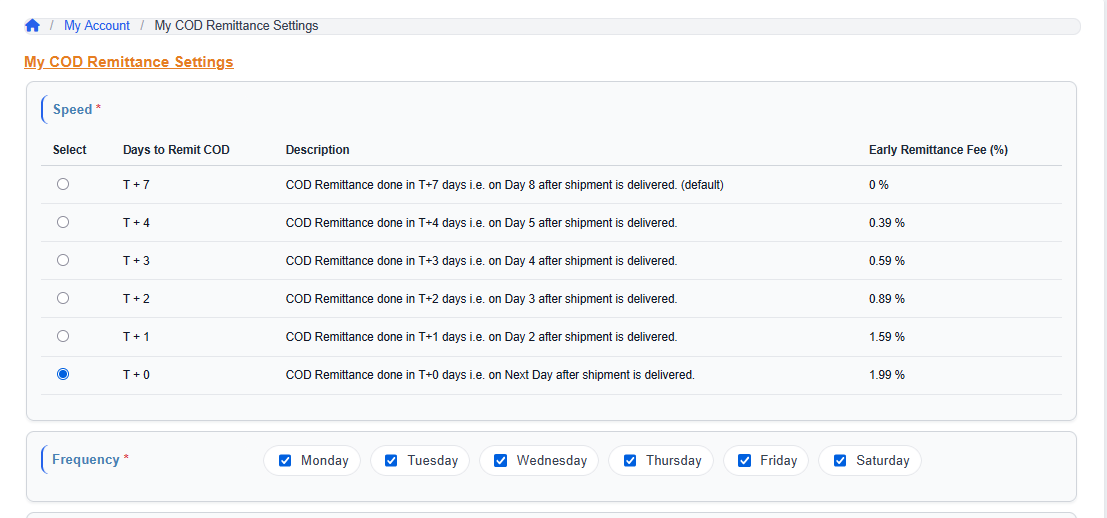
By default, COD remittance is done on T+7 basis, which means 7 business days after shipment delivery. You can also choose to receive COD remittance earlier by updating settings in COD Remittance Settings (COD Remittance Report).
The Early COD (Cash on Delivery) scheme allows small business clients to receive their COD remittance faster than the default T+7 schedule. Clients can choose T=0, T+1, T+2, T+3, or T+4 to improve cash flow. You can opt in by updating your COD Remittance Report.
| Select | Days to Remit COD | Early Remittance Fee (%) including GST |
|---|---|---|
| T + 7 | COD Remittance done in T+7 days (Day 8 after delivery) – default | 0% |
| T + 4 | COD Remittance done in T+4 days (Day 5 after delivery) | 0.39% |
| T + 3 | COD Remittance done in T+3 days (Day 4 after delivery) | 0.59% |
| T + 2 | COD Remittance done in T+2 days (Day 3 after delivery) | 0.89% |
| T + 1 | COD Remittance done in T+1 day (Day 2 after delivery) | 1.59% |
| T + 0 | COD Remittance done in T+0 days (Next Day after delivery) | 1.99% |
Volumetric weight is a derived weight based on the space your shipment occupies. It is used to calculate shipping charges fairly for large but light packages.
Volumetric Weight Formula:
Volumetric weight (gm) = L × B × H (cm) / 5000
Example:
• Item weight: 250 gm
• Box weight: 100 gm
• Box dimensions: 17 × 10 × 15 cm
Calculations:
• Dead Weight = 250 + 100 = 350 gm
• Volumetric Weight = (17 × 10 × 15) / 5000 = 510 gm
• Chargeable Weight = 510 gm
Tip: To avoid volumetric billing, use efficient packaging - smaller boxes with adequate padding for protection.
Dead Weight is the actual weight of the parcel measured with a weighing scale.
Chargeable weight is the higher of Dead Weight or Volumetric Weight. You can use the Estimate Shipment Cost feature to understand both the dead weight and volumetric weight of your shipment.
You can check the balance of your iCarry Wallet in My Account > My Wallet.
You can open a Helpdesk Ticket after you are registered as a client. If you are not registered with us, please send an email to support@icarry.in.
B2C/B2B single shipment costs within India can be estimated using the Domestic Rate Calculator.
For multiple parcels to the same destination address, use the Multi-Box Calculator.
You can also download the full download the full rate chart.
Tip - How to reduce shipment cost?
We aggregate shipments across many clients, resulting in thousands of shipments monthly for our courier partners. This allows them to give us good rates, and we share the same with you (after keeping a small margin).
By default, all domestic B2C shipments are covered up to Rs. 1000 under our Lost In Transit Liability program at no extra cost.
"Lost" means the shipment is not delivered or returned within 45 days.
You can also purchase additional insurance during shipment booking by selecting the "purchase insurance" option (if available for your shipment).
Once a shipment is confirmed LOST, the value of the shipment or the insured amount (whichever is lower) will be credited to your iCarry Wallet within 2-5 business days.
Please note that iCarry.in is a booking platform. We do not handle pickup, transit, or delivery. You can choose a courier from our platform and open a Ticket with evidence if your parcel is damaged.
Guidelines for claims:
• Couriers have limited liability for damages. External packaging damage may be covered up to the plan limit plus any additional insurance purchased.
• Couriers are not liable for liquid or fragile items if packing is inadequate.
• Customers should NOT accept visibly damaged shipments. If accepted, the signed POD must clearly mention the type of damage.
• A video showing the received parcel from all sides and the unpacking process is required for damage claims. The timestamp must be visible in the video or screenshot.
If shipment has not been picked:
You can try editing the shipment (if the option is available) in My Account > My Shipments.
If shipment has been picked and is in transit:
If the shipment has not reached its destination, we can try updating the details manually with the courier. This is done on a best-effort basis and is not guaranteed. You can request this via a Helpdesk Ticket.
If shipment has reached the destination:
It is not possible to update the address once delivery attempts have started. Mobile number changes may be possible with some couriers before delivery on a best-effort basis only.
Yes, you can. It is your responsibility to pack fragile items properly.
Fragile stickers are available in the market and can also be printed from our site (designs: Fragile 1, Fragile 2, Fragile 3, This Side Up).
Please note: marking a shipment as fragile is a guideline for couriers, not a guarantee. The safety of the packaging is still your responsibility.
No. Liquid items can only be sent via Standard (Surface) shipment mode.
Sorry, we do not provide packaging material or packing services at the doorstep. You will need to arrange your own packaging.
Packing depends on the type of contents you are sending. For example, a good quality envelope may be enough for documents but not for bottles or fragile items.
• Use thick, sturdy cardboard boxes for fragile items.
• Ensure there are no gaps inside the box; fill empty space with bubble wrap or other padding materials.
• Seal bottle lids properly to prevent leakage.
• Fragile and "This Side Up" stickers are guidelines for handling, not a guarantee.
Packing is ultimately the client's responsibility. Proper packing helps minimize the risk of damage in transit.
GST invoices are auto-generated by the 2nd of every month for the prior month's charges. You can download them from My Account > My Invoices. Month-wise invoices for previous months are available for download.
Go to My Account > API Credentials. Click on the "Generate Key" button and save it. This is a ONE-TIME step, and after this, you can continue booking shipments without errors.
Yes, we provide API support. All details can be found on our API & Extensions page.
API End-Points include:
• Authentication / LOGIN
• Get ESTIMATE - Domestic / By Courier / International
• Book Shipment - Standard / Express / Choose Courier / International
• CANCEL / REVERSE Shipment
• TRACK Shipment / SYNC STATUS
• POST Callback on status change / SYNC Shipment Charges
• PRINT Shipment Label
• Check serviceability by PINCODE
• Pickup address management (Add / Update)
Yes, we have a WordPress / WooCommerce connector. You can set it up directly from your panel without installing anything on your WordPress site.
Steps: Main Menu > API / Integrations > WordPress.
If you face any difficulty during setup or need assistance for the first time, open a Helpdesk Ticket.
Note: We have stopped supporting older plugins as they caused upgrade issues. Using this connector avoids such problems.
Generating API credentials using your WordPress/WooCommerce admin panel is easy and needs to be done only once for the initial setup:
1. Login to your WordPress admin panel.
2. Click on WooCommerce.
3. Click on Settings.
4. Click on the Advanced tab.
5. Click on Rest API and then click Add Key to create a new API set.
6. Enter 'icarry_private_connector' in Description.
7. Keep the default user or select one if not already selected.
8. Set Permissions to 'read/write' and click Generate API Key.
9. Copy and save the Consumer Key and Consumer Secret displayed on the screen.
10. Paste the above consumer key and consumer secret in the corresponding text boxes in iCarry and Save.
Store URL: This is generally found in your browser’s URL. For example, if your admin URL is https://abcd.com/wp-admin, the Store URL is abcd.com.
Sync After Order Id: Keep it blank for the first time; this will sync the last two days of orders.
After initial setup, your WordPress store orders will automatically appear in iCarry within 15 minutes. Orders will be in Unassigned status under My Account > My Shipments. You can then:
• Book shipments using the Actions column for each order.
• Use Bulk Book Shipment under Bulk Actions to book multiple shipments at once.
Old and Not Supported: Previous WordPress WooCommerce plugin is no longer supported. It allowed multiple pickup addresses, shipment booking, cost estimation, cancellation, label printing, and bulk sync.
Yes, we have an OpenCart Extension. It is free for use and supports multiple pickup addresses (for drop shippers), shipment booking, cost estimation, cancellation, label printing, and bulk sync.
Yes, we have a Shopify Connector. You can set it up directly from your iCarry panel without downloading anything:
• Go to Main Menu > API / Integrations > Shopify.
• If you face any difficulty or need help for the first-time setup, please open a Helpdesk Ticket.
Generating credentials using your Shopify admin panel is easy and needs to be done only once for initial setup:
1. Login to your Shopify admin panel.
2. Click on Apps.
3. Click on Develop Apps and Create An App.
4. Create an App with name iCarry.in.
5. Click on Configure Admin API Scopes. Following Admin API permissions are required:
6. Save Permissions.
7. Click on the API Credentials tab to get the Admin API Access Token, API Key, and Secret Key.
8. Copy the required settings into iCarry panel and Save.
Store Name: The name you have given your store (brand name).
Store URL: Usually part of the browser URL (e.g., xyz.myshopify.com). Not the domain name. Example: fe1234-2.myshopify.com.
Keeping the Sync After Order Id blank will sync the last two days of orders. Keep it blank for first time setup.
After initial setup, your Shopify orders will automatically appear in iCarry within 15 minutes. Orders will be in Unassigned status under My Account > My Shipments. You can then:
• Book shipments using the Actions column for each order.
• Use Bulk Book Shipment under Bulk Actions to book multiple shipments at once.
We have a WIX Connector for order sync and fulfillment. You can set it up directly from your iCarry panel without downloading anything:
• Go to Main Menu > API / Integrations > Wix.
• If you face any difficulty or need first-time help in setup, please open a Helpdesk Ticket.
We have a Flipkart Connector for order sync and fulfillment. You can set it up directly from your iCarry panel without downloading anything. Please ensure approval from Flipkart for self-shipment before attempting setup:
• Go to Main Menu > API / Integrations > Flipkart.
• If you face any difficulty or need first-time help in setup, please open a Helpdesk Ticket.
We have a Zoho Connector. You can set it up directly from your iCarry panel without downloading anything:
• Go to Main Menu > API / Integrations > Zoho.
• If you face any difficulty or need first-time help in setup, please open a Helpdesk Ticket.
We are integrated with Unicommerce. You can set up and book shipments directly in your Unicommerce panel:
1. Set up an account with iCarry.in and complete KYC and approval process.
2. Once your iCarry account is approved, complete the integration in two minutes using the iCarry <-> Unicommerce link.
If you face any difficulty or need first-time help in setup, please open a Helpdesk Ticket.
Currently, we provide services within India using the following couriers:
• Delhivery
• Bluedart
• Shadowfax
• Ekart Logistics
• Xpressbees
• DTDC
• Ecom Express
For international shipments (India to foreign countries), we use Fedex and Aramex.
As more couriers are added to our network, they will be seamlessly provided to all clients.
We cover 27,000+ pincodes in India.
Deliverability to a destination pincode depends on the sender pincode, weight, prepaid/COD, and other factors. The best way to confirm deliverability is to enter all details and use the Estimate Shipment Cost tool. This performs a real-time check and gives the most accurate answer.
If you prefer an Excel file, we can provide a downloadable list of supported pincodes. Note that this file is not real-time and may not be 100% accurate.
Yes, you can top up via NEFT or UPI using Internet/Mobile banking or payment apps like PhonePe, BHIM, Google Pay, Paytm, etc.
After making the payment, send a screenshot via Ticket, WhatsApp, or email so we can confirm and manually top up your account. Allow a few hours for offline processing. Payments outside business hours may take 24+ hours.
NEFT Payment:
• Account Name: ICARRY TECHNOLOGIES PVT LTD
• Account Number: 50200064198984
• Bank: HDFC Bank
• IFSC Code: HDFC0000354
UPI Payment Id: icarry.in@ybl
QR code can be used for easy payment.
Billing is initially based on weight, dimensions, and other data entered during booking. If actual courier-reported data differs, charges are revised. You get 5 business days to dispute the revised weight.
Raising a dispute individually:
Upload shipment images supporting your claim in Main Menu > My Shipments > Weight Discrepancy Shipments. Images can also be uploaded immediately after booking for future disputes.
Required images:
• Weight: Box on scale showing weight clearly
• Length: Box with ruler showing length
• Breadth: Box with ruler showing breadth
• Height: Box with ruler showing height
• AWB/Barcode: Box face up showing barcode/AWB
Raising disputes in bulk:
High-volume shippers can upload standard product images in Main Menu > My Shipments > My Products. If a shipment contains products with uploaded images, disputes are automatically raised using the existing data.
Time to resolve dispute:
Once the courier responds (usually within days or weeks), we update your account and reverse incorrect charges if resolved in your favor. Your support with images and patience is essential.
Tip - Article on how to reduce weight discrepancies
▶ Watch Tutorial: Resolve Weight Discrepancy & Raise Dispute
Cash on Delivery (COD): The delivery executive collects the declared parcel value at the time of delivery before handing over the shipment. If payment is not made, the shipment will not be delivered and will be returned to the sender.
Prepaid: The receiver has already paid for the goods. The delivery executive will deliver the shipment without collecting any payment at the time of delivery.
To book international shipments, your account must first be approved. You can upload KYC documents in My Account > Edit Profile or send an email from your registered account with the following documents (as applicable):
• GSTIN certificate
• PAN card
• Aadhar card
• IEC certificate (Import Export Code)
If you do not have GSTIN, PAN and Aadhaar are compulsory.
Approval depends on submitted documents, account history, nature of products, and perceived risk. It may take a few days. Additional document requests will be communicated via email.
Surface Shipments:
• Zone A (same city): 1-2 business days
• Zone B (within approx 500 km): 2-3 business days
• Zone C (metro - metro): 2-4 business days
• Zone D (Rest of India): 4-7 business days
• Zone E/F (J&K, North East): 5-9 business days
Air Shipments:
• Zone C (metro - metro): 1-2 business days
• Zone D (Rest of India): 3-4 business days
• Zone E/F (J&K, North East): 3-5 business days
We provide an Excel upload facility to book multiple shipments at the same time. Ensure sufficient balance is available in your wallet before bulk upload to avoid shipment failures. Use the tutorial with screenshots and sample Bulk Upload Excel file for guidance.
▶ Watch Tutorial: Upload Amazon Tab Delimited TXT File
▶ Watch Tutorial: Create Bulk Shipments – Excel, Amazon & Shopify Upload
International shipments typically take 7-15 days. Delivery may take longer depending on the shipping partner and destination. ETA and tracking updates will be available via the tracking system.
Scenario 1: Original Shipment Already Delivered via iCarry.in
Go to My Account > My Shipments.
Click the Reverse Shipment button next to the delivered shipment.
Hand over the shipment to the pickup executive or the person assigned to collect the package.
The pickup executive will pack the shipment and paste the shipping label.
Scenario 2: Original Shipment was not Delivered via iCarry.in
1. Add a new pickup address via Main Menu > My Addresses > Pickup Addresses.
2. Book a shipment like a regular forward shipment using the new pickup address and your address as the consignee. Share the shipment label and manifest with the sender, and ensure the parcel is packed, sealed, and handed over to courier.
This is not an iCarry.in website error. It is a Wi-Fi or browser issue. Try the following:
• Turn off your router, wait 10 seconds, then turn it back on.
• Try accessing iCarry.in from another device or mobile data.
If the issue persists, send a detailed screenshot via email or WhatsApp.
POD can be requested from the courier if your customer claims non-receipt.
Types of POD:
• OTP-based verification at delivery (stronger proof, paper POD cannot be provided for OTP verified deliveries)
• Signature on paper run-sheet or mobile device (only if OTP-based verification is unavailable)
POD requests must be raised within 3 days of delivery. Open a Helpdesk Ticket with the AWB number to request POD. Beyond 3 days, it may not be possible or will be on a best-effort basis.
Sometimes door delivery may not be possible due to remote locations or ODA (Out of Delivery Area) pincodes. Ask your customer to collect the parcel from the courier office within 3 business days with valid government-issued ID. If not collected, it will be returned to the shipper. Shipment charges cannot be waived in such cases.
E-Way Bill is mandatory for shipments with invoice value over ₹50,000. Generate the E-Way bill (check with your accountant) and provide a printout to the courier along with the invoice. You can also send a soft copy to us via email for courier updates.
Transporter Ids for reference:
• Delhivery – 06AAPCS9575E1ZR
• DTDC LTL - 88AAACD8017H1ZX
• Ekart LTL - 07AADCI8374D2ZH
• Xpressbees – 27AAGCB3904P2ZC
• Bluedart – 27AAACB0446L1ZS
• Gati – 36AADCG2096A1ZY
• Ecom Express – 07AADCE1344F1Z2
Yes, we offer different plans to cater to high, medium, and low shipment volume shippers. At present, we offer four plans: Bronze, Silver, Gold, and Platinum.
| Plan | Monthly Fee | Shipment Rates Starting At | Support | Lost Shipment Liability | Account Manager |
|---|---|---|---|---|---|
| Bronze | Free | ₹ 26 – 500gms * | Chat, Email, Tickets | ₹ 5000 max | No |
| Silver | ₹ 5,000 / month + GST | ₹ 25 – 500gms * | Chat, Email, Tickets | ₹ 5000 max | No |
| Gold | ₹ 10,000 / month + GST | ₹ 24 – 500gms * | Chat, Email, Tickets | ₹ 5000 max | No |
| Platinum | ₹ 20,000 / month + GST | ₹ 23 – 500gms * | Call, Chat, Email, Tickets | ₹ 5000 max | Yes |
* Calculated at 500gms, Zone A, exclusive of GST with select courier partner. Rates may vary based on zone, weight, courier, etc.
International shipment cost can be estimated at International Rate Calculator. We currently support international shipping to 245 countries via Fedex and Aramex.
KYC is needed for one-time initial setup of your account and prior to booking shipments.
• For enabling shipments within India:
• If you have GSTIN: Upload or send GST certificate and PAN card. For private limited/partnership companies, company PAN card is required.
• If you do not have GSTIN: Account holder PAN card and Aadhaar card should be uploaded.
• For enabling international shipments: Domestic KYC is adequate for gift/sample/personal shipments (up to INR 25,000). For commercial shipments, you can also provide IEC document, Bank AD code, etc.
How to complete KYC: Upload KYC docs via Account Profile. Alternatively, send documents by email to kyc@icarry.co.in or WhatsApp to +91-6362182961.
Go to My Account > My Address > Pickup Address and click Add New Address to add new pickup points.
Couriers require multiple documents for Customs clearance. These can be printed with the shipment label. Examples include:
• Commercial Tax Invoice
• PAN
• GST certificate (for commercial shipments)
• Fedex Authorization Letter
• Letter of Undertaking (LUT)
• Hazardous Contents Declaration (if applicable)
• Shipper's Letter of Instruction (SLI)
1. Add New Pickup Address: Go to My Account > My Address > Pickup Address and click Add New Address.
2. Book New Shipment: Book shipment as usual using the new pickup address.
3. Share Shipment Label: Print the label (PDF) and share it with the contact at the newly added pickup point.
Sorry for the unfortunate experience. In general, the courier does not have liability for the contents once the shipment is delivered and accepted by the consignee. Always advise consignees to not accept parcels which are damaged externally and to take pictures/videos to share with us to allow us to open a dispute with the courier.
If shipment is already delivered and contents are reported missing, we can help raise a dispute with the courier. To resolve it in your favor, we need:
1. The invoice and video of contents as it was packed.
2. Photo showing the packed box in its original form.
3. Photo of the box as it was received.
4. Unpacking video of the shipment when delivered.
Provide this information as soon as possible, as delays could result in the dispute being rejected by the courier due to time lapse.
Prohibited Articles:
• Anything in contravention of any law currently in force.
• Indecent or obscene material, including prints, photos, books, or cards.
• Letters, postcards, or parcels with offensive, seditious, threatening, or obscene words/marks.
• Explosives, inflammable, dangerous, filthy, noxious, or deleterious substances.
• Living creatures or items that may injure postal articles in transmission.
• Lottery-related materials except government-authorized lotteries.
• Gold coins or bullion exceeding Rs. 20,000/-.
Dangerous Goods:
• Oil-based paints, thinners, industrial solvents
• Insecticides, garden chemicals
• Lithium batteries, magnetized materials
• Machinery containing fuel, automobile batteries, infectious substances
• Compounds, liquids, or gases with toxic characteristics
• Bleach, flammable adhesives, arms and ammunitions, dry ice
Restricted Items:
• Precious stones, gems, and jewellery
• Uncrossed bearer drafts, cheques, currency, and coins
• Poison, firearms, explosives, and military equipment
• Hazardous or radioactive materials
• Foodstuff, liquor, pornographic material, hazardous chemicals
More details on Dangerous Goods and Prohibited Articles can be seen here.
RTO (Return to Origin) charge is the same as the forward freight charge.
• For Prepaid Shipments: RTO charge = Forward charge.
• For COD Shipments: RTO charge = Forward freight charge. The COD fee will not be applied in case of RTO.
Tip: How to reduce RTO?
Please open a Helpdesk Ticket and attach the TDS certificate (PDF copy). The amount paid by you as TDS against our invoice will be credited to your iCarry wallet as a balance.
Appointment-based delivery service is currently available only for Delhivery LTL and Ekart LTL courier options, and for heavy or bulky shipments.
• Additional charges apply for appointment-based delivery where the courier delivers at a selected day and time slot.
• Demurrage charges may apply if the shipment is held at the delivery center for more than 3 days.
• If the consignee does not take delivery at the scheduled appointment, new appointment and demurrage charges will apply to the shipper.
For normal B2C couriers, appointment-based deliveries are not offered. Any requests are on a best-effort basis. Shipments not collected within 3 days will be returned.
NDR stands for Non-Delivery Report. It is generated when a courier partner is unable to deliver your shipment to the customer. Common reasons include:
• Customer not available at the delivery address
• Incorrect or incomplete address
• Customer's phone number not reachable
• Customer refused to accept the delivery
• Fake delivery attempt by the courier executive
• Many more…
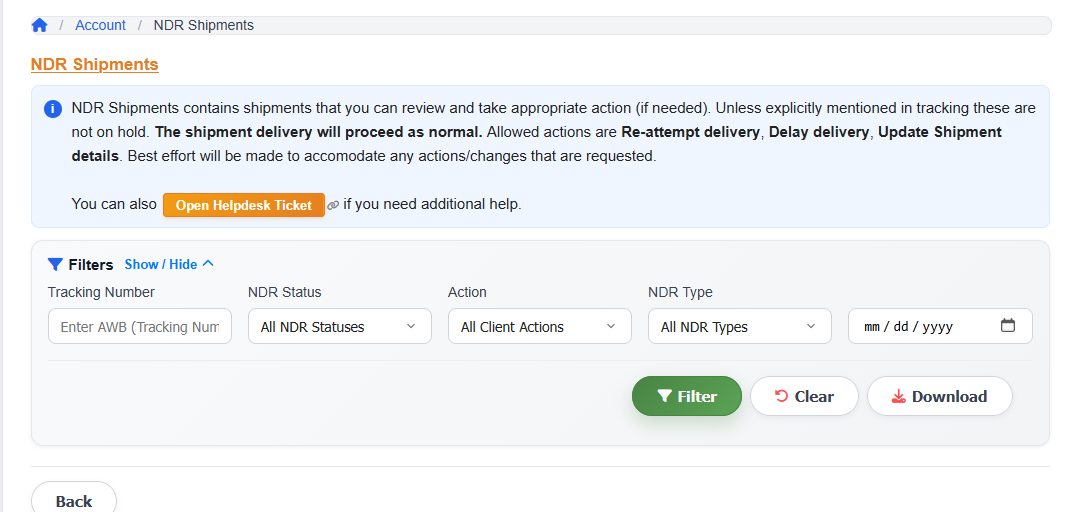
When an NDR is raised, it appears under My Shipments > NDR Shipments in your iCarry® panel. You must take action on these promptly to ensure orders get delivered. You can either request a reattempt or initiate RTO to avoid the shipment being automatically returned.
To take action on an NDR:
1. Go to My Shipments > NDR Shipments from the left side menu.
2. Locate the shipment showing the NDR status.
3. Click on the shipment to view the reason for non-delivery.
4. You will see two options:
• Reattempt – request the courier to attempt delivery again. You can add comments such as updated address, landmark, or customer availability timing to help the delivery executive.
• Return to Origin (RTO) – if you do not want to reattempt, initiate a return to your pickup address.
Please note: Most couriers attempt delivery up to 3 times before marking a shipment as RTO. After all attempts are exhausted, a reattempt is on a best-effort basis only and is not guaranteed.
If WhatsApp Engagement is enabled, your customer will receive a WhatsApp message for NDR resolution directly, and iCarry® handles follow-up on your behalf.
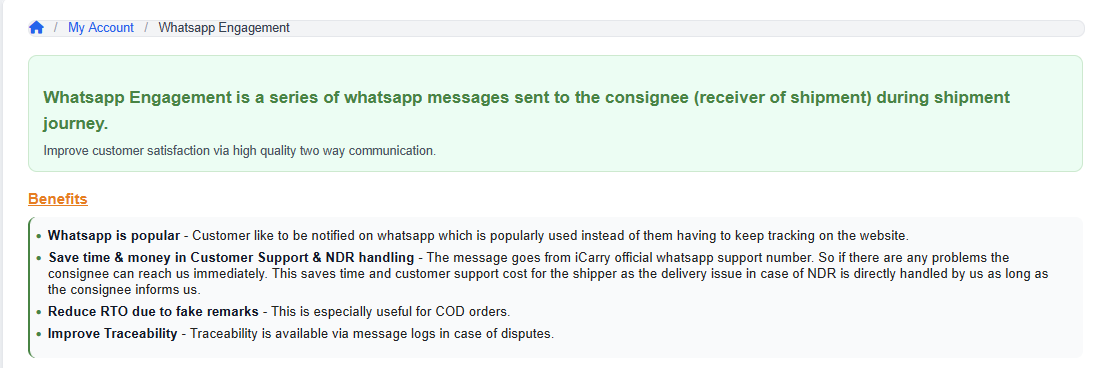
WhatsApp Engagement is a feature offered by iCarry.in that not only improves your order deliverability but also hugely helps in your customer satisfaction.
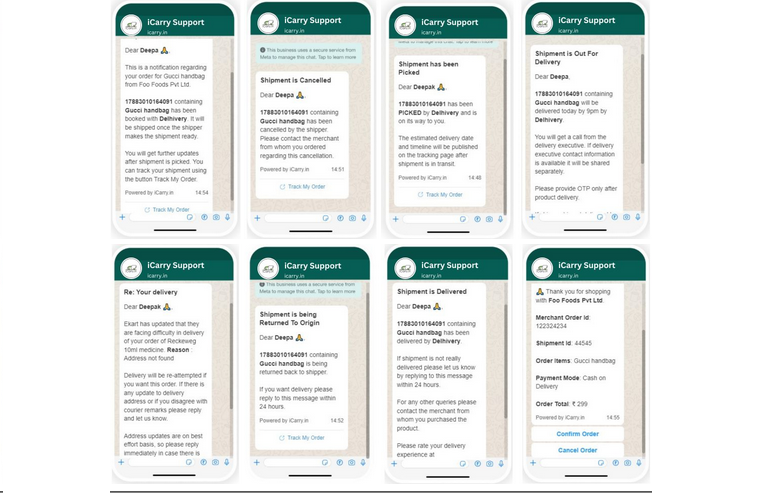
This feature is an interactive two-way communication from iCarry®'s official WhatsApp support number to the customer's WhatsApp number, giving them timely shipment updates. Customers can reply to the messages for any changes or requests and our agents will help them out. This saves time and cost for clients as they do not have to invest in a customer support person on their end to co-ordinate deliveries.
Benefits:
• Customers are notified and can interact with the iCarry® team on WhatsApp at every key delivery stage
• Saves time and money on customer support - you do not have to invest in hiring a person for customer support since our team does it for you
• If there is an NDR, the customer can reach iCarry® directly and we handle it on your behalf
• Reduces RTO due to fake NDR remarks from courier, especially useful for clients who ship COD orders
• Your Customer Support mobile number and email can be added so customers can contact you directly if needed
• Traceability available via message logs in case of disputes
You can enable WhatsApp Engagement from Settings > WhatsApp Engagement in your panel.
This service is chargeable at a nominal rate, subject to company policy. Please log in to your account to view the most current rates.
▶ Watch Tutorial: WhatsApp Engagement
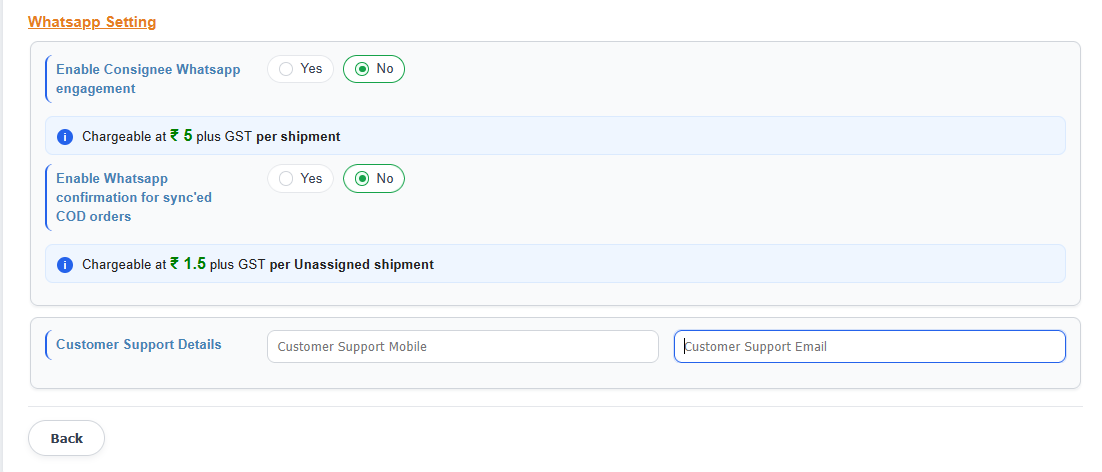
WhatsApp COD Confirmation is a feature that automatically sends a WhatsApp message to your customer to confirm their Cash on Delivery order before it is dispatched for delivery. This helps verify buyer intent upfront, reducing the chances of refusal at the doorstep and lowering your RTO rate.
Once you enable this feature, iCarry.in sends a WhatsApp message to the customer with all the order details before the shipment is dispatched. Only after the customer confirms through WhatsApp does the seller proceed with packing and dispatching the order. All customer conversations are recorded for your reference.
Benefits:
• Confirms the customer genuinely wants the COD order before delivery is attempted
• Reduces COD refusals and fake NDRs at the doorstep
• Helps identify invalid or incorrect contact numbers early
• Especially useful for businesses syncing orders via Shopify, WooCommerce, etc.
• Traceability available via message logs in case of disputes
This service is chargeable at a nominal rate, subject to company policy. Please log in to your account to view the most current rates.
How to enable: Go to Settings > WhatsApp Engagement > Enable WhatsApp Confirmation for Sync'd COD Orders > Select Yes > Save.
Note: This feature applies specifically to COD orders synced from your store integrations (Shopify, WooCommerce, etc.) in Unassigned status. It is separate from the general WhatsApp Engagement feature which sends delivery status notifications.
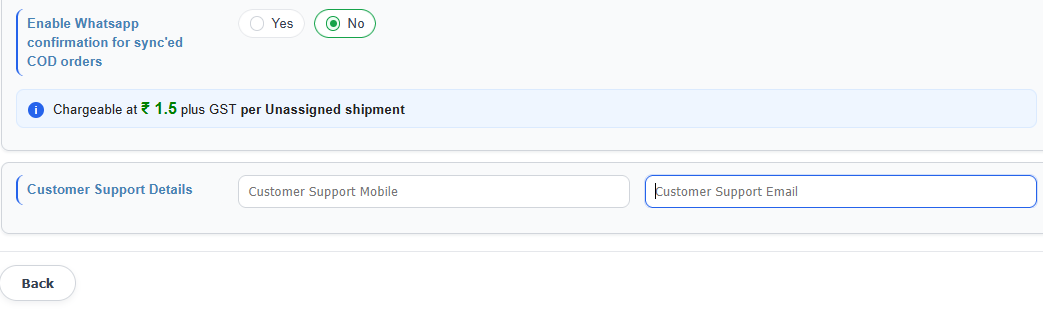
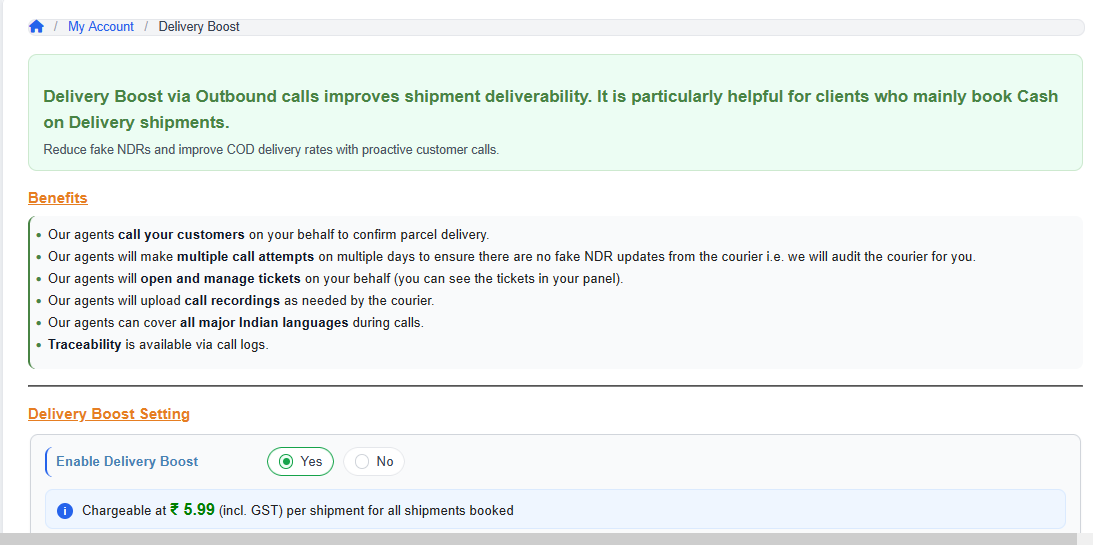
Delivery Boost is a premium iCarry® feature where our trained agents call your customers on your behalf to confirm parcel delivery and update the delivery address in case of NDR. This helps reduce fake NDR (Non-Delivery Report) updates raised by courier partners.
Here is what our agents do:
• Make multiple call attempts across multiple days to confirm delivery
• Open and manage helpdesk tickets on your behalf (visible in your panel)
• Upload call recordings as needed by the courier
• Cover all major Indian languages
• Traceability available via call logs
You can enable Delivery Boost from Settings > Delivery Boost in your iCarry® panel. While enabling, you can choose to apply it to All Shipments or COD Shipments Only, depending on your requirement.
This service is chargeable at a nominal rate, subject to company policy. Please log in to your account to view the most current rates.
▶ Watch Tutorial: Delivery Boost
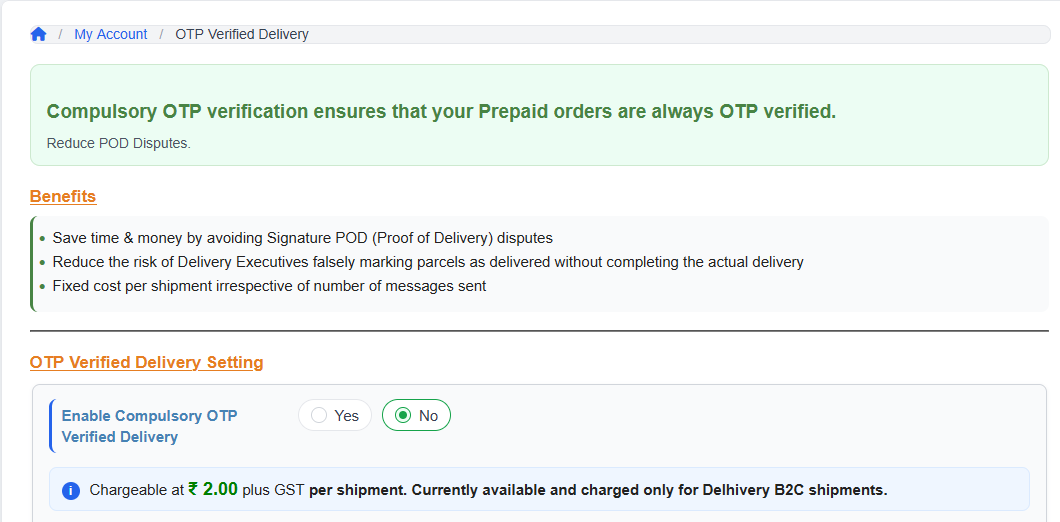
Compulsory OTP Verified Delivery ensures that your Prepaid orders are always delivered only after the consignee provides a One-Time Password (OTP) sent to their registered mobile number. This reduces POD (Proof of Delivery) disputes significantly.
Benefits:
• Save time and money by avoiding Signature POD disputes
• Reduce the risk of delivery executives falsely marking parcels as delivered without completing actual delivery
• Fixed cost per shipment, irrespective of number of messages sent
Important: This feature is currently available and charged only for Delhivery B2C shipments.
Once OTP verification is completed, a paper signature POD cannot be requested separately - OTP verification is considered a stronger and legally valid proof of delivery. No delivery dispute can be raised on an OTP-verified shipment.
You can enable this from Settings > OTP Verified Delivery in your iCarry® panel.
This service is chargeable at a nominal rate, subject to company policy. Please log in to your account to view the most current rates.
▶ Watch Tutorial: OTP Verified Delivery
In case of a product mismatch - either on delivery to your customer or when a return arrives back to you - follow these steps immediately.
Evidence required (must be submitted within 3 days of delivery or return):
• Unpacking video – Record the full unboxing from sealed state to opened state without gaps, with the AWB number clearly visible and a timestamp showing date and time. Before and during the opening process, the parcel should be rotated and clearly shown from all sides for verification of its overall condition.
• Packing video – video of how the item was packed before dispatch, showing contents and sealing process
• Photos of the box received from all sides
How to raise the dispute:
1. Open a Helpdesk Ticket from your iCarry® dashboard.
2. Attach the unboxing video, packing video, and photos.
3. Mention the AWB number and clearly describe the mismatch.
iCarry® will raise the dispute with the courier partner on your behalf. Please note that delays in submitting evidence may result in the dispute being rejected by the courier due to time lapse.
Always advise your customers not to accept visibly damaged or tampered parcels. If accepted, the signed POD must clearly note the condition of the parcel at the time of acceptance.
LTL (Less Than Truckload) Dense is a Delhivery shipping mode designed for heavy or bulky B2B shipments where the dead (actual) weight is higher than the volumetric weight. It is suitable for "dense" items - i.e. items which are very heavy but not very bulky (e.g. metal machinery). In such cases, it offers lower and more cost-effective rates compared to standard LTL shipping.
When using a Dense account, it is especially important to enter correct length, breadth, and height dimensions. This is because the denominator for volumetric weight calculation for Dense is 2700, which is much lesser than the denominator for a regular LTL account.
The ₹2,000 MWA (Minimum Wallet Amount) refers to the minimum balance that must be maintained in your wallet to use this shipping mode.
Eligibility and rules:
• A minimum wallet balance of ₹2,000 is required to activate Dense shipping on your iCarry® account
• If volumetric weight is lower than dead weight, LTL Dense is the better option
• If volumetric weight is higher than dead weight, standard Delhivery LTL is more suitable
• A Delhivery challan is mandatory for all Dense shipments
Note: If a Dense shipment is cancelled, charges on hold will be released back to your wallet after 4 business days as per Delhivery Cargo rules.
Unbilled charges are estimated amounts held in your iCarry® wallet against pending adjustments that have not yet been finalised. These can include:
• Weight discrepancy charges – if a courier has reported a higher weight than declared, the difference is held until the discrepancy window closes or a dispute is resolved
• RTO charges – for shipments currently returning to you, the return freight is held until confirmed
• MWA (Minimum Wallet Amount) – a security hold applied per shipment based on weight:
• ₹500 MWA for lighter shipments (up to 20 kg)
• ₹1,000 MWA for heavier shipments (above 20 kg)
This hold is an estimated security amount that is adjusted or released once the shipment is fully reconciled with the courier.
Usable Balance = Total Wallet Balance minus Unbilled/Pending Charges. Once all shipments are reconciled, held amounts are released back to your usable balance or adjusted against actual charges.
You can view a full breakdown in the left side navigation menu under Wallet > History.
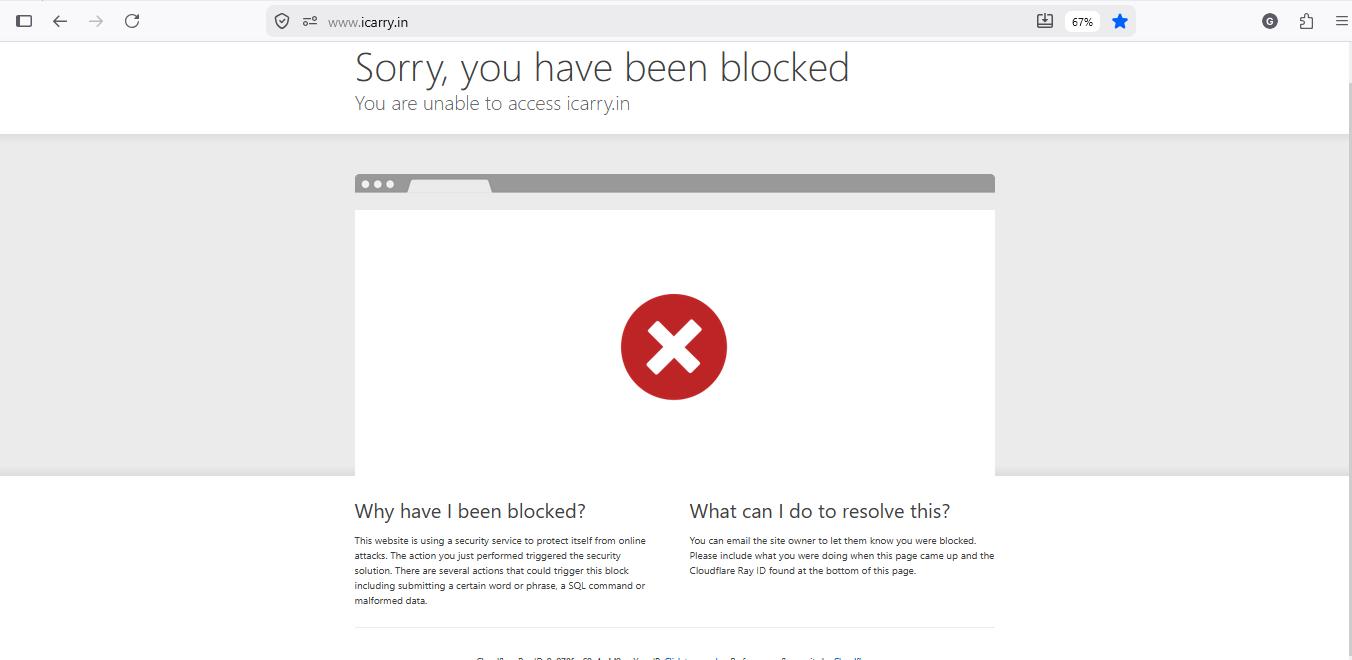
This happens when our security system temporarily blocks access due to unusual activity from your network or browser.
Note: This is not an account issue. It is a temporary security restriction.
To resolve this issue, please follow these steps:
1. Visit: https://whatismyipaddress.com
2. Copy your IP address and take a screenshot of the page
3. Take a screenshot of the blocked error page
4. Make sure the screenshot is taken from the same browser where the issue occurred
5. Do not switch network (WiFi / Mobile Data) before taking the screenshot
After collecting the above details:
Please share your IP address and both screenshots (blocked error and IP address) with our support team via:
• Email: support@icarry.in
This will help us quickly identify and unblock your access.
The iCarry.in API specification document can be downloaded here: https://www.icarry.in/icarry-api.pdf
In the API spec there is a save_only input parameter. Please pass this parameter with a value of 1. Using this input parameter during booking will create the shipment in Unassigned status. This shipment can then be manually assigned to a courier by the client.
Address Quality Scoring is a free built-in feature that scores every shipment address from 0 to 100, so you know how deliverable it is before the courier picks it up.
Each address gets one of four quality bands:
● Good (86–100) – Complete, structured address with high delivery confidence
● Fair (60–85) – Recognisable but incomplete – minor gaps or inconsistencies
● Poor (40–59) – Significant structural gaps – delivery success uncertain
● Very Poor (0–39) – Highly incomplete or ambiguous – strong candidate for delivery failure
The score is powered by multiple checks including pincode validity, address completeness, landmark details, and consistency between location fields.
You can view the Address Quality Score for every shipment in My Account > My Shipments. If you spot a Very Poor score, you can contact your customer and correct the address before pickup – avoiding unnecessary RTO and extra costs.
No setup required. It's completely free and already built into your workflow.